liveBook · Manning

Stroke contrast

As explained in Web Design Playground, Second Edition

Stroke contrast is the difference in thickness between the thinnest and thickest strokes of a typeface.

Stroke contrast is the difference between a typeface’s thinnest and thickest strokes. Low contrast keeps delicate strokes from disappearing on small screens, helping text stay readable. section 20.3

When choosing a typeface for a portfolio or other screen-based page:

  • Look for minimal variation between thin and thick strokes rather than dramatic contrast. section 20.3
  • Check stroke contrast alongside counters, apertures, and x-height; these characteristics work together to support legibility. section 20.3
  • When pairing heading and body typefaces, choose fonts with compatible legibility characteristics, including similar stroke contrast. section 20.3
Figure 20.2 When deciding on a typeface that will render well even on small displays, look for larger counters and apertures, good x-height, and low stroke contrast.
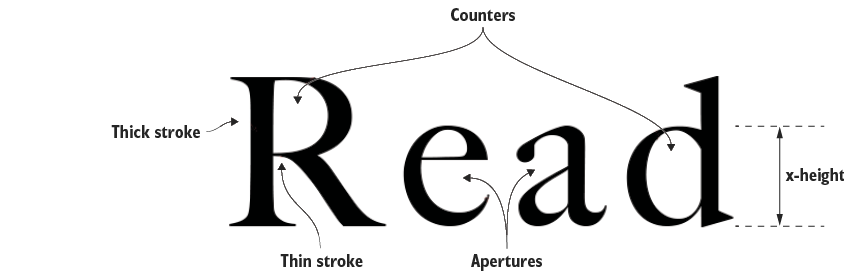
Compare typefaces by looking for larger counters and apertures, a useful x-height, and low stroke contrast for small displays. section 20.3


How Web Design Playground, Second Edition covers it

How deep it goes
Defines stroke contrast and explains its readability effect, but does not examine typographic construction or measurement.
Examples
Uses small-screen typeface selection, font pairing, and Figure 20.2 as concrete reference points.
What you can do after
Evaluate typefaces for low stroke contrast and compare their legibility characteristics when pairing fonts.
How it connects
Connects stroke contrast with counters, apertures, x-height, legibility, and typeface pairing.

Also explained in

Compare how 2 books explain stroke contrast →

This explainer was generated by Manning's knowledge graph from the text of Web Design Playground, Second Edition. The section links point to the parts of the book it draws on.