Sysmon, short for System Monitor, is a free Windows logging utility for security monitoring and threat hunting. It runs as a Windows system service and device driver, remains active across reboots, and writes detailed system activity to the Windows Event Log. It is a data source rather than an event-analysis engine: investigators must search, correlate, and interpret its events. section 3.3 section 3.1.4
Its value is the investigative detail it preserves. Sysmon can record process creation with current and parent command lines, process image hashes, process GUIDs, session GUIDs, network connections, file-creation-time changes, and dynamically filtered events. Process and session GUIDs help maintain correlations when process IDs are reused or when activity must be followed within one login session. section 3.3.1
Sysmon event types provide coverage across common hunting pivots:
- Process activity: ProcessCreate events identify the executable, command line, parent process, hashes, and process GUID. section 3.3.1
- File and Registry activity: FileCreate, file-creation-time, Registry create, delete, and rename events expose changes that may accompany execution or persistence. section 3.3.1
- Network and execution-related activity: optional NetworkConnect events, plus ImageLoad, CreateRemoteThread, ProcessAccess, WMI, DNS query, named-pipe, and process-tampering events broaden investigative visibility. section 3.3.1
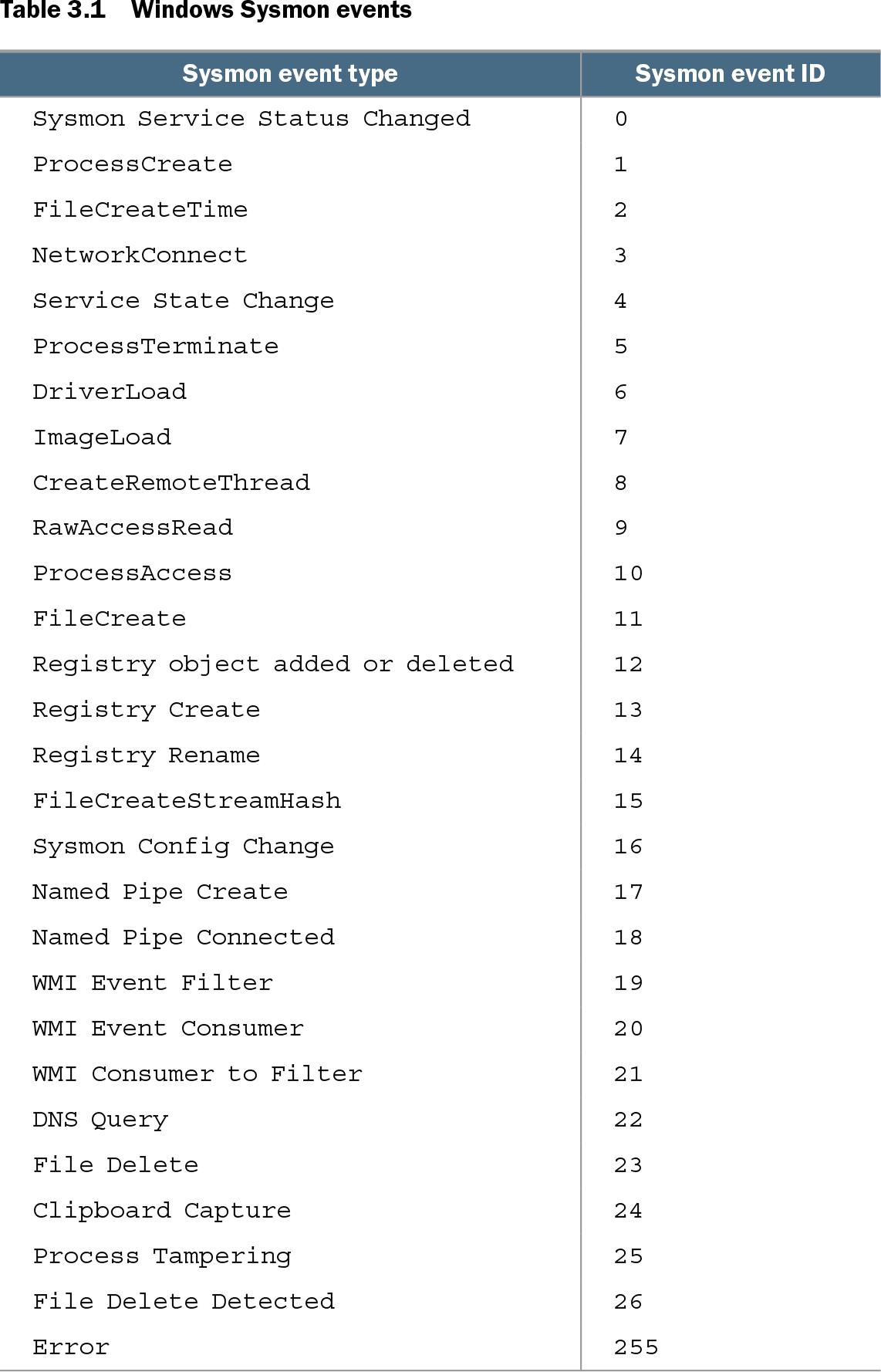
Table 3.1 Windows Sysmon events (view table figure)
| Sysmon event type |
Sysmon event ID |
|---|---|
|
|
|
|
|
|
|
|
|
|
|
|
|
|
|
|
|
|
|
|
|
|
|
|
|
|
|
|
|
|
|
|
|
|
|
|
|
|
|
|
|
|
|
|
|
|
|
|
|
|
|
|
|
|
|
|
|
|
|
|
|
|
|
|
|
|
|
|
|
|
|
|
|
|
|
|
|
|
|
|
|
|
|
|
Use the event-type and event-ID reference to choose an initial search pivot. For example, Event ID 1 covers process creation, Event ID 3 network connections, Event ID 11 file creation, and Event IDs 12–14 Registry changes. section 3.3.1
Reconstructing an Office-to-PowerShell execution chain
A hunt can begin with a suspicious parent-child relationship rather than a known malicious file. Search ProcessCreate events for Word spawning PowerShell, then search FileCreate events for Word writing a .ps1 file. Pivot on the discovered filename and host to find related command lines and parents. In the illustrated sequence, a Word document launches cscript, which launches PowerShell with ExecutionPolicy Bypass and then cmd.exe commands that invoke rundll32 against several DLLs. Ordering those records by time turns isolated clues into a threat-execution timeline. section 3.1.4 section 3.0
Listing 3.1 Search for Word spawning PowerShell in Sysmon events using Humio
sourcetype="XmlWinEventLog:Microsoft-Windows-Sysmon/Operational" AND
_raw.EventID=1 AND
(_raw.ParentCommandLine=/winword.exe/i) AND (_raw.CommandLine=/powershell/i)
This query demonstrates the hunt logic: constrain results to Sysmon ProcessCreate events, then match both the Word parent command line and a PowerShell child command line. Equivalent logic can be adapted to another event store. section 3.1.4
Collection requires deliberate configuration. Sysmon events are XML-formatted and relatively large—around 2 KB in the example—so high activity and broad rules can create substantial storage and licensing costs after forwarding events from many Windows systems to a SIEM or central event store. Default configuration does not collect network-monitoring events. Use a configuration file and include or exclude rules to retain the events most relevant to monitoring and hunts. section 3.3.1 section 3.1.4
Listing 3.22 Sysmon configuration for files with extension .ps1
<RuleGroup name="" groupRelation="or">
    <FileCreate onmatch="include">
        <TargetFilename condition="end with">.ps1</TargetFilename>
A targeted FileCreate rule illustrates focused collection: include file creations whose target filename ends in .ps1, rather than collecting every possible file event. section 3.1.4