Tabnine is an AI-powered coding assistant that gives context-aware suggestions while you work in supported editors. It offers Deep Completion, aims to match the style of the code being written, and can run locally for offline use or through a cloud service for faster suggestions. It also supports chat-driven help inside the IDE. section 1.2.1 section 8.3.2
Use Tabnine as a collaborator rather than an automatic answer button. It can suggest completions, generate API documentation, explain code, propose changes, and help troubleshoot errors, but generated documentation and code still need careful review for accuracy, fit, and clarity. section 1.8.5 section 8.4.3
Debugging a session insert failure
When reopening a Flask practice-test application caused a SQLite UNIQUE-constraint error, paste the error into Tabnine chat and use its diagnosis as a starting point. Check the database state, inspect the generated fix through the IDE diff, then test the change. In this case, the initial proposal did not fully solve repeated question_set_id inserts; examining the loop exposed the remaining defect and led to a revised insert strategy. section 6.1 section 6.1
For test generation, Tabnine can analyze a function and an existing test file, propose a test plan, and generate a candidate test. Be specific about the intended framework and test setup: a generated unittest using Mock was revised through a prompt into a pytest test using an existing in-memory database fixture. Run the result and consider ordering, edge cases, assumptions, assertions, and reusable fixtures. section 8.4.3 section 8.4.5
Choose a working mode that matches the task:
- Use completions and documentation assistance for small, in-context edits and API documentation. section 1.2.1 section 1.8.5
- Use chat to paste an error, ask for likely causes, and refine a proposed repair after inspecting evidence. section 6.1
- Use the test shortcut or chat to generate a plan, then request a test framework, fixture, or database setup that matches the project. section 8.4.3
- Consider local or on-premises options and model choice when privacy and code security matter. section 8.3.2 section 8.4.5
Figure 8.13 Tabnine generates a full test plan for your application. It suggests several tests you might consider for your application.
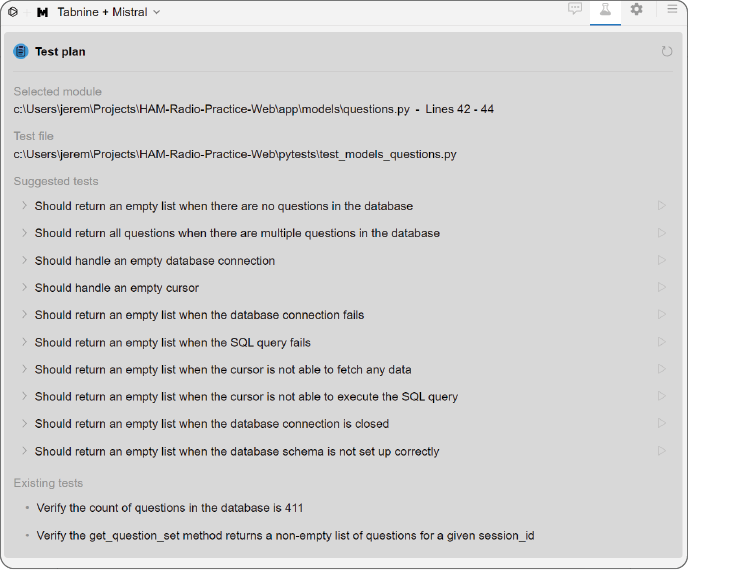
A generated test plan makes the assistant’s proposed coverage visible before selecting or revising an individual test. section 8.4.3
