TagHelperOutput represents the HTML element produced during tag-helper processing. A tag helper receives it in Process, then changes the element, attributes, content, or surrounding markup before Razor renders the view. section 25.2.1
Use TagHelperOutput to control these parts of the rendered result:
- Set TagName to change the output element’s tag name. section 25.2.1
- Use Attributes to add or modify attributes, such as applying Bootstrap classes to a tr element. section 25.2.1
- Use Content to replace or define the element’s content, and GetChildContentAsync() to access the original content. section 25.2.1
- Use PreElement and PostElement to insert markup outside the target element, or PreContent and PostContent to surround its existing content. section 25.3.3
Applying output attributes
A tag helper can transform configured attributes into output markup. In TrTagHelper, output.Attributes.SetAttribute("class", $"bg-{BgColor} text-center text-{TextColor}") replaces or sets the class attribute, producing Bootstrap styling such as bg-dark text-center text-white. section 25.2.1
Adding content around an element
A wrapper tag helper appends a div before and after an element with wrap="true" through output.PreElement.AppendHtml(elem) and output.PostElement.AppendHtml(elem). A highlighting tag helper instead places <b><i> before the existing content and </i></b> afterward through PreContent and PostContent. section 25.3.3
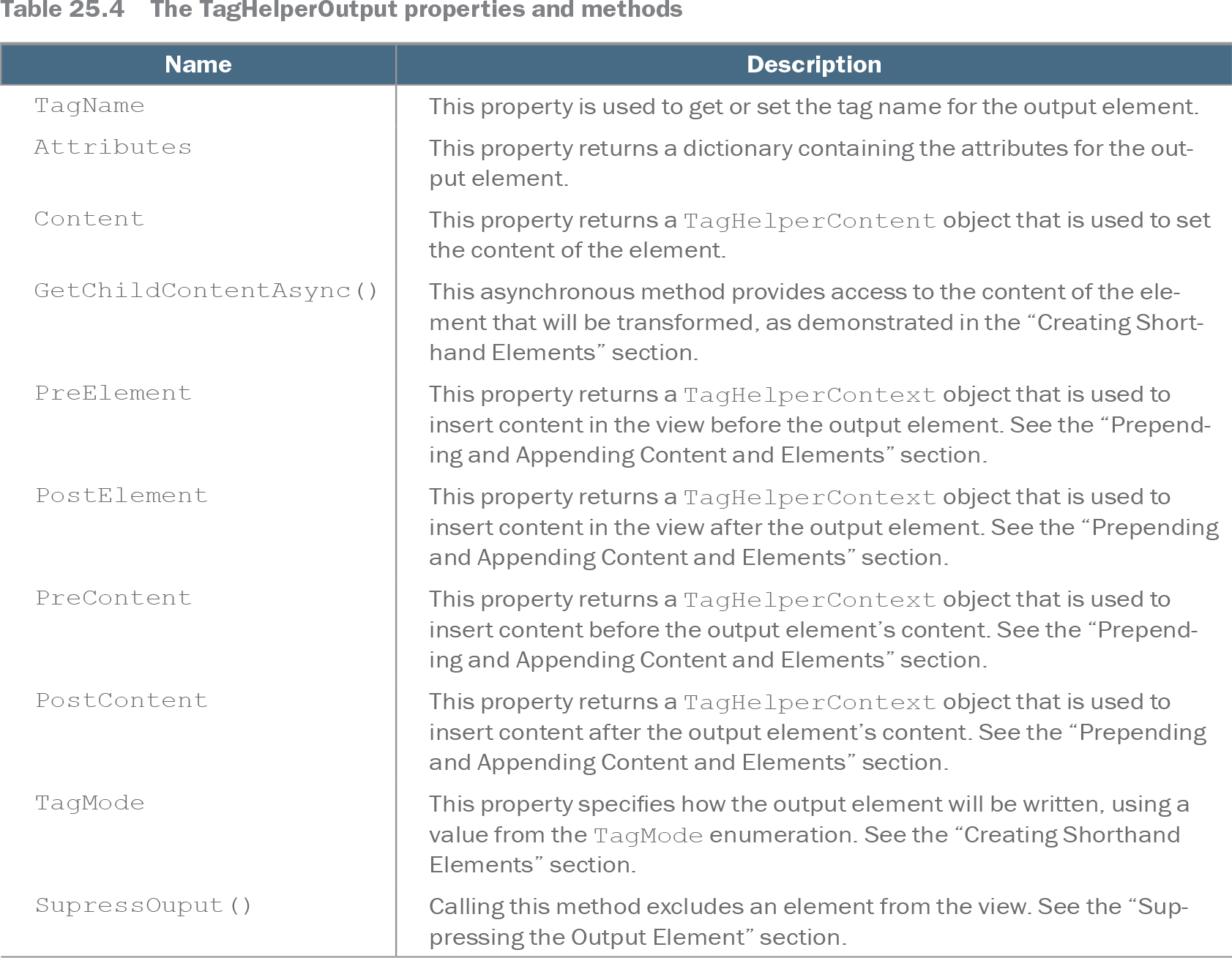
Table 25.4 The TagHelperOutput properties and methods (view table figure)
| Name |
Description |
|---|---|
| TagName |
This property is used to get or set the tag name for the output element. |
| Attributes |
This property returns a dictionary containing the attributes for the output element. |
| Content |
This property returns a TagHelperContent object that is used to set the content of the element. |
| GetChildContentAsync() |
This asynchronous method provides access to the content of the element that will be transformed, as demonstrated in the “Creating Shorthand Elements” section. |
| PreElement |
This property returns a TagHelperContext object that is used to insert content in the view before the output element. See the “Prepending and Appending Content and Elements” section. |
| PostElement |
This property returns a TagHelperContext object that is used to insert content in the view after the output element. See the “Prepending and Appending Content and Elements” section. |
| PreContent |
This property returns a TagHelperContext object that is used to insert content before the output element’s content. See the “Prepending and Appending Content and Elements” section. |
| PostContent |
This property returns a TagHelperContext object that is used to insert content after the output element’s content. See the “Prepending and Appending Content and Elements” section. |
| TagMode |
This property specifies how the output element will be written, using a value from the TagMode enumeration. See the “Creating Shorthand Elements” section. |
| SupressOuput() |
Calling this method excludes an element from the view. See the “Suppressing the Output Element” section. |
Browse the output API reference for TagName, Attributes, Content, GetChildContentAsync(), and surrounding-element properties. section 25.2.1