Team membership is the association between a user and a team that determines access to team resources. It is a useful primary permission boundary for an engineering platform: a developer who joins a team can gain access to that team’s tools, infrastructure resources, and custom APIs without requesting each permission separately. Authentication establishes who the developer is; membership supplies an authorization claim. section 7.3.1 section 7.5
Keep the source of membership distinct from the identity provider (IDP) that issues credentials. Corporate identity may authenticate a user while GitHub teams provide self-managed membership. The IDP acts as an intermediary: it obtains the user’s teams from the membership source and includes them in returned identity claims. Other permission boundaries may still be needed. section 4.3.3 section 7.3.1
Extend membership-based access incrementally:
- Create a team in the chosen membership system and let its members manage membership through a self-service experience. section 7.3.1
- Connect tools that support the team directly. CircleCI can connect context permissions to GitHub teams; tools without native support may need an API that synchronizes membership. section 7.3.1
- Use team claims to authorize Kubernetes resources and custom platform APIs, so the same boundary can govern access beyond SaaS tools. section 7.3.1
A developer accessing team resources from a terminal
A CLI starts an OAuth 2.0 device-authorization flow. The developer authenticates through GitHub; the IDP retrieves the teams they belong to and creates a verifiable JSON Web Token containing the team list as a claim. The CLI can then use the resulting credentials to access the developer’s team resources. An example setup uses Auth0 for the IDP and configures its application through an automation pipeline. section 7.3.2
Figure 7.8 For Epetech, we would like our IDP service to have built-in or easily configurable means of integrating with GitHub, requiring authentication through whatever means we have set up in GitHub. As a result of (1) successful authentication, we want the IDP to (2) get the list of all teams the user is a member of in our GitHub organization. Finally, we want to (3) return to the user a secure means of accessing the platform infrastructure or custom API resources.
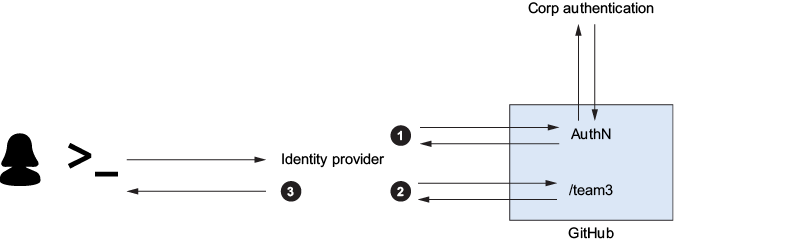
The diagram traces the access path from GitHub authentication through retrieval of team memberships to credentials for platform infrastructure or custom APIs. section 7.3.1
