A NumPy array’s shape gives the number of elements along each axis. A grayscale image that is 182 pixels wide and 45 pixels high has array shape (45, 182): rows come before columns. Check this ordering before reshaping or indexing image data. section 4.1.1
Shape describes the extent of a view, not how its elements are reached in memory. Strides supply the byte step along each axis. Starting with ten contiguous uint32 values, reshaping to (2, 5) and transposing to (5, 2) can produce different perspectives on shared data without copying it. Inspect both `.shape` and `.strides`, then use `np.shares_memory` to check whether an operation made a view. section 4.1.2
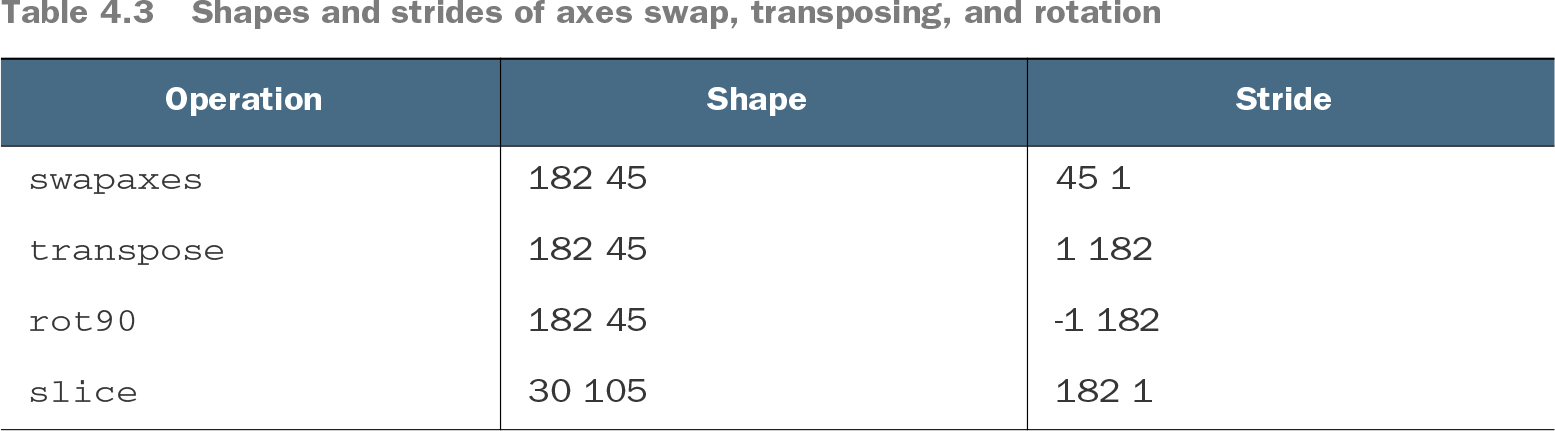
Table 4.3 Shapes and strides of axes swap, transposing, and rotation (view table figure)
Compare the reported shapes and strides: reshaping, transposing, and rotating can yield shape (182, 45) while traversing the image differently. Shape alone does not establish the resulting image or memory layout. section 4.1.3
Use shape as a practical check when processing large arrays:
- For flips and slices, inspect changed strides as well as the resulting shape. These operations can retain shared data instead of allocating another large array. section 4.1.3
- For arithmetic, account for broadcasting rather than requiring equal shapes. Adding one scalar to a large array avoids allocating a same-shaped array of ones. section 4.2.2
- Do not assume every reshape remains a view: reshaping a stepped slice can require a copy. Avoid setting arbitrary shapes and strides with `as_strided` without extreme care. section 4.1.2 section 4.1.3