Manually clicking through a cloud portal can leave behind fragile, hard-to-reproduce infrastructure. Terraform replaces those clicks with a declarative blueprint: you describe what you want, and the tool determines the steps and calls the cloud provider’s API. section 9.6.2 section 9.7
Terraform is the engine; HashiCorp Configuration Language (HCL) is the syntax used to write its configuration. Keep the blueprint in version control so changes have a history and environments are easier to recover. section 9.6.2 section 9.12
A database with a memory
Suppose your configuration asks for one PostgreSQL database. Terraform records what it built in a state file. On a later run, it compares the configuration, state, and real cloud resources; if nothing has changed, there is nothing to do. If the configuration changes the allocated storage from 50 to 100, Terraform calculates the required change. section 9.7.2
Figure 9.5 Terraform doesn't just "run scripts"; it reconciles reality with your text files!
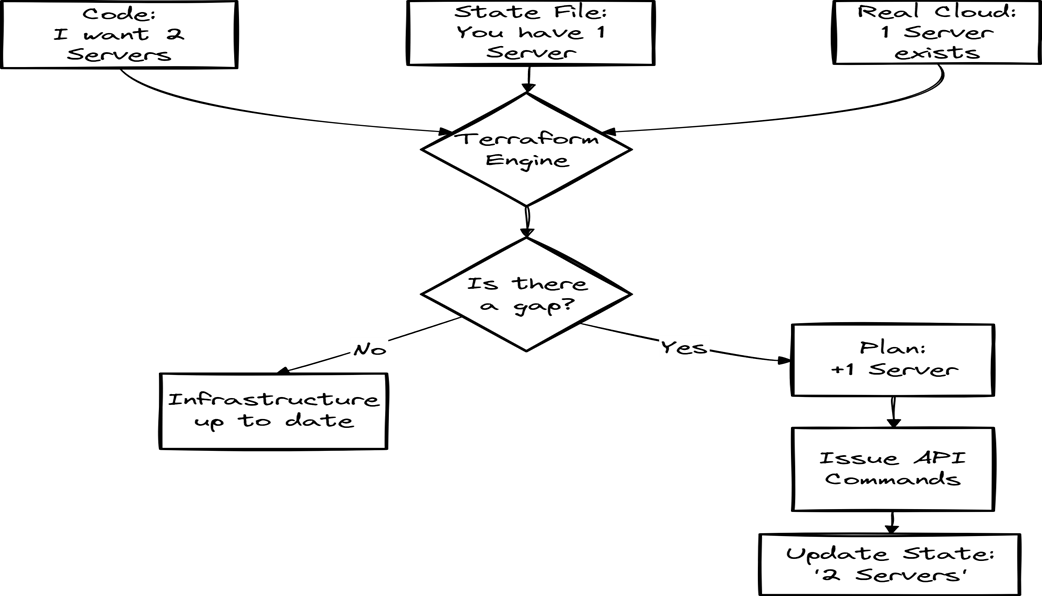
See how Terraform reconciles configuration, state, and real infrastructure. section 9.7.2
The state file is important: losing it can leave existing resources unmanaged. For teams, durable remote state and state locking help prevent both loss and conflicting deployments. Modules can also split a large blueprint into smaller pieces, such as networking, databases, and serverless functions. section 9.7.3
To try Terraform without turning practice into a surprise bill:
- Install the Terraform CLI, choose a provider, and start with a small resource such as a storage bucket in main.tf. section 9.1.4
- Use a provider’s free tier or LocalStack for practice, and set a billing alarm. section 9.1.4
- Destroy practice resources when finished with terraform destroy. section 9.1.4