Terraform Automation and Collaboration Software, usually called TACOS, addresses the operational work around Terraform: integrating changes, coordinating reviews, managing state, and deploying approved infrastructure updates. These platforms connect Terraform workflows to Git repositories and can provide hosted or self-managed execution. section 1.1.3 section 6.4.1
A TACOS platform commonly combines these capabilities:
- GitHub and GitLab integration for publishing modules from Git tags and triggering infrastructure workflows. section 1.1.3
- Speculative plans that show the likely effect of pull-request changes before deployment. section 1.1.3
- Deployment of approved changes as they are merged, alongside state management and, in some products, private module registries. section 1.1.3 section 8.6.3
- Integration with broader CI/CD systems such as GitHub Actions, CircleCI, or Jenkins for testing, formatting, and linting. section 1.1.3
A pull-request deployment workflow
A team stores Terraform code in GitHub and connects the repository to a TACOS platform. A pull request produces a speculative plan for review; merging the approved change starts deployment. The platform manages remote state and may expose earlier state versions through a web interface. External backups remain necessary even when the platform manages state transparently. section 1.1.3 section 8.6.3
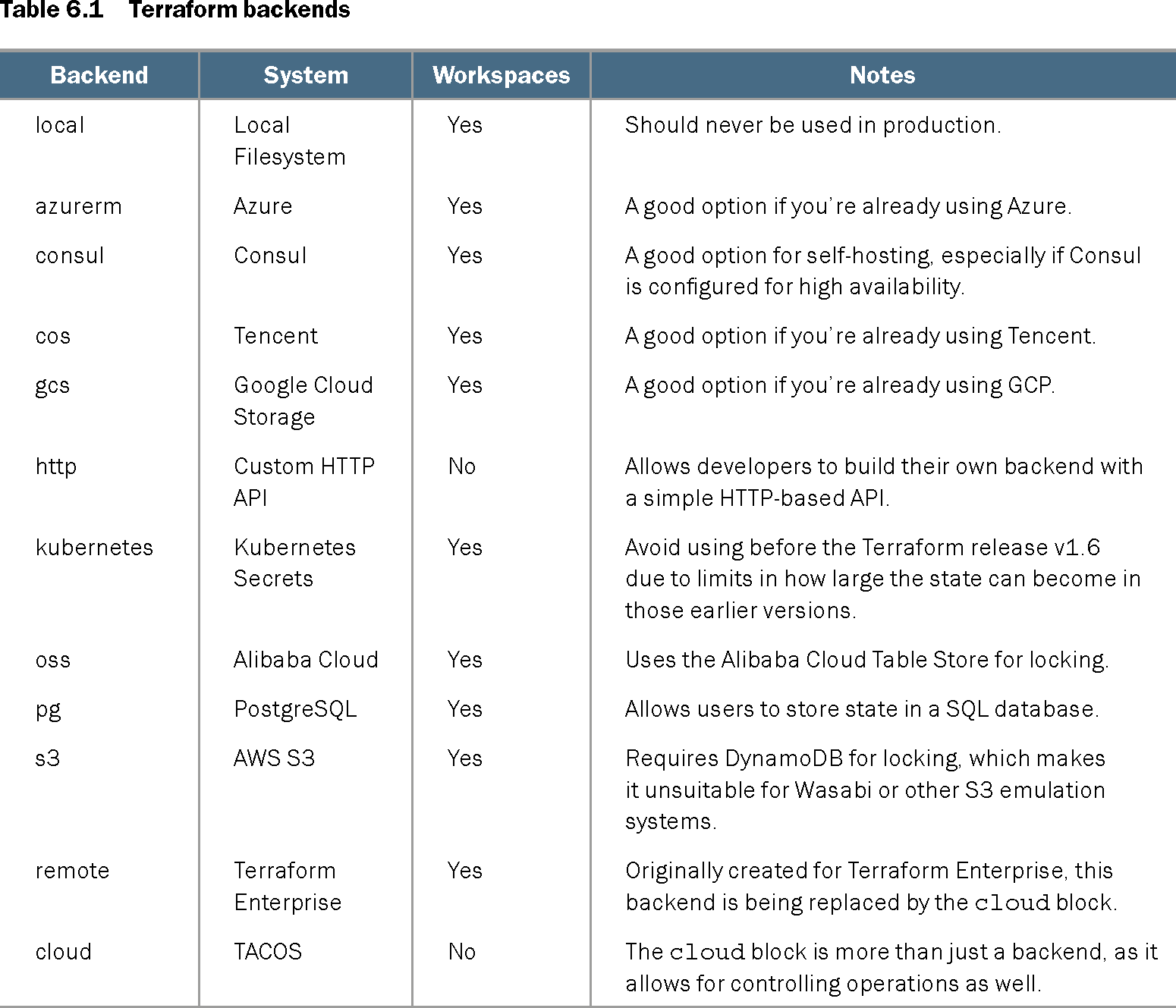
Table 6.1 Terraform backends (view table figure)
| Backend |
System |
Workspaces |
Notes |
|---|---|---|---|
| local |
Local Filesystem |
Yes |
Should never be used in production. |
| azurerm |
Azure |
Yes |
A good option if you’re already using Azure. |
| consul |
Consul |
Yes |
A good option for self-hosting, especially if Consul is configured for high availability. |
| cos |
Tencent |
Yes |
A good option if you’re already using Tencent. |
| gcs |
Google Cloud Storage |
Yes |
A good option if you’re already using GCP. |
| http |
Custom HTTP API |
No |
Allows developers to build their own backend with a simple HTTP-based API. |
| kubernetes |
Kubernetes Secrets |
Yes |
Avoid using before the Terraform release v1.6 due to limits in how large the state can become in those earlier versions. |
| oss |
Alibaba Cloud |
Yes |
Uses the Alibaba Cloud Table Store for locking. |
| pg |
PostgreSQL |
Yes |
Allows users to store state in a SQL database. |
| s3 |
AWS S3 |
Yes |
Requires DynamoDB for locking, which makes it unsuitable for Wasabi or other S3 emulation systems. |
| remote |
Terraform Enterprise |
Yes |
Originally created for Terraform Enterprise, this backend is being replaced by the cloud block. |
| cloud |
TACOS |
No |
The cloud block is more than just a backend, as it allows for controlling operations as well. |
Compare Terraform backend choices by storage system, workspace support, and operational notes when a dedicated TACOS platform is not being used. section 6.4.1