A text box is a rectangular form control where a visitor types a short piece of information. It turns a read-only page into an interactive form: visitors can enter details, then submit them to the form’s endpoint. Typical uses include a name, email address, or favorite number. section 8.3.2 section 8.0 section 8.3.1
Choose the input type to match the information requested. A plain text box accepts letters, numbers, and symbols. Number boxes are for numeric data, email boxes check for a valid email address, and URL boxes are for web addresses. Number fields can also display up and down arrows for changing the value. section 8.3.2
Figure 8.4 The four main text box input types
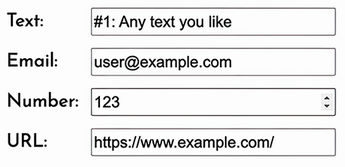
Compare the four common text-box types before deciding what each field in a form should collect. section 8.3.2
Configure each text box so visitors know what to enter and the form can enforce its basic rules:
- Add a label that describes the control, such as Name or Email address. section 8.7
- Set a character width to control the box’s visible size. section 8.3.2
- Provide an initial value when a useful default exists; visitors can edit or replace it. section 8.3.2
- Use placeholder text for a short hint that disappears when typing begins. section 8.3.2
- Set minimum or maximum character lengths, and mark the field required when it must be completed before submission. section 8.3.2
A sign-up form field
For an event sign-up form, request a visitor’s name in a text box and an email address in an email field. Make the email field required, add a placeholder such as “Type your email address,” and place labels in one column with controls in the next. A detailed prompt can ask ChatGPT to generate the HTML and CSS for this arrangement. section 8.3.2 section 8.4
Use a text box for short answers. When visitors need to write feedback, suggestions, questions, or a biography, use a text area instead. Text areas support multiline entries and can be sized with rows and columns; they can also have length limits and be required. section 8.3.4
After generating a form, customize text-box size, placeholder, and value by changing only the text inside the relevant quotation marks. Keep each field’s type and name values unchanged. You can also revise the surrounding labels and page text without removing their HTML tags. section 8.6
A well-specified form pairs each needed detail with the right control, a clear label, and appropriate limits. Add a submit button so the browser can send completed form data to the endpoint. section 8.7 section 8.3.1






