A text box is a user-interface control for entering one line of text. In Streamlit, st.text_input displays the control and returns the entered value as a string. section 3.6.1
Use a text box when an app needs a value from the user:
- Collect a value for processing, such as a number to convert. section 3.6.1
- Collect a password before checking it against a list of rules. section 2.5.2
- Guide entry with placeholder text, a tooltip, or password-entry behavior. section 3.6.1
A unit-converter input
Create a labeled input with an initial string value: input_num = st.text_input("Value to convert", value="0"). Because the control returns a string, cast it to a float when the next operation requires a number: input_num = float(st.text_input("Value to convert", value="0")). section 3.6.1
A password-checking flow
A password checker reads the value from a text input, waits for the user to click a button, checks the value against rules, and displays each result as passed or failed. section 2.5.2
Figure 2.5 The flow of logic in our password checker app
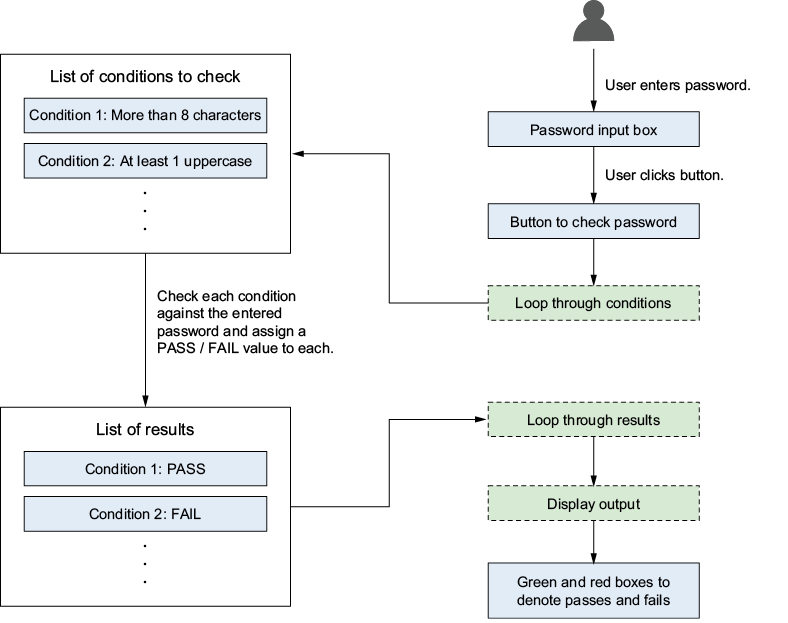
Trace how entered text moves through input, rule checking, result generation, and visible status boxes. section 2.5.2






