The CSS color property is the paintbrush for an element’s text. Give it a color value, and the browser uses that color when rendering the text. It changes the letters, not the area behind them; background-color handles that separate job. section 4.32
A CSS rule first selects the element to style, then places a property and value inside braces. The property name comes before a colon, and the declaration ends with a semicolon. section 1.17
A tiny text-painting rule
Write a rule in this shape: selector { color: value; }. Replace selector with the page element you want to affect and value with the text color you want the browser to use. Think of the selector as choosing the sign and color as choosing its ink. section 1.17 section 4.32
Choose text colors as part of the page’s overall visual message:
- Keep the palette small: two or three colors are often enough, while too many hues can confuse users or tire their eyes. section 17.15
- Use shades of a few hues when more variation is needed instead of adding many unrelated colors. section 17.15
- Use color relationships deliberately: complementary hues are 180 degrees apart in hsl() and can work as a main hue plus an accent. section 17.15
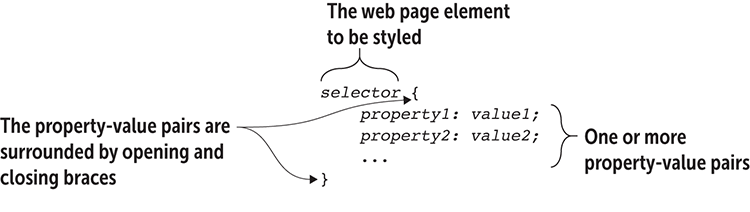
Use the rule diagram to spot the five pieces of a CSS style rule: selector, braces, property, value, and punctuation. section 1.17

