`throw` raises a terminating error: normal execution stops at the point where the failure is detected. Use it when continuing would make an automation unsafe, incomplete, or misleading. The design decision comes first: identify conditions that must halt the process rather than merely report a problem. section 2.1.1 section 6.1.1
A file-cleanup automation can build an archive path with `Join-Path`, then test whether that file already exists. If it does, `throw` prevents the automation from overwriting existing data. This makes a precondition explicit: a unique archive name is required before later work can proceed. section 2.1.1
Figure 2.3 The automation process to ensure that you have a unique file name for the archive file each time the file cleanup automation runs
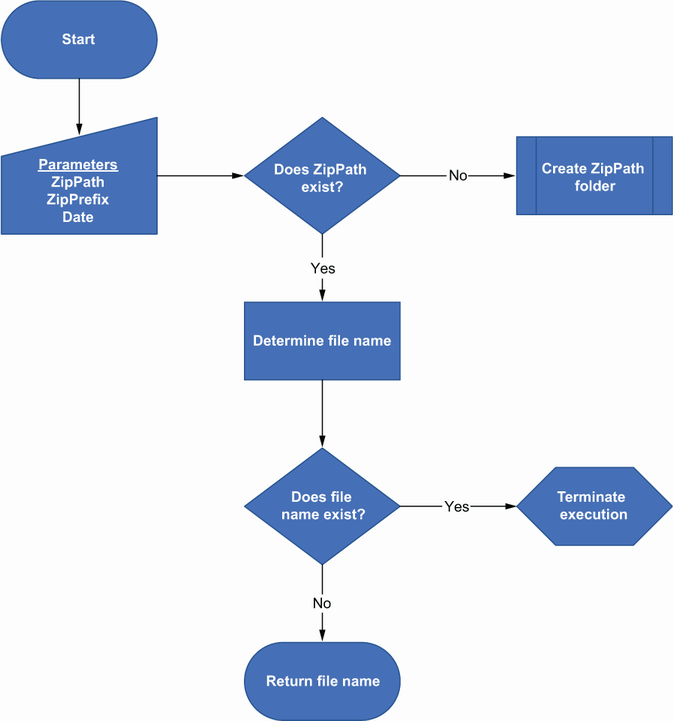
The process view shows the decision point where an existing archive name stops the cleanup automation instead of allowing a possible overwrite. section 2.1.1
A terminating error inside a `try` block changes the control flow rather than ending the whole script immediately: PowerShell skips the rest of `try` and runs `catch`. With no error, `catch` is skipped. A `finally` block runs last in either case, making it suitable for work that must happen after either outcome. section 6.1.1
Figure 6.2 When code in a try block throws an error, the catch block is run, and then the finally block is run. If there is no error, the catch block is skipped, and the finally block is run after the try block finishes.
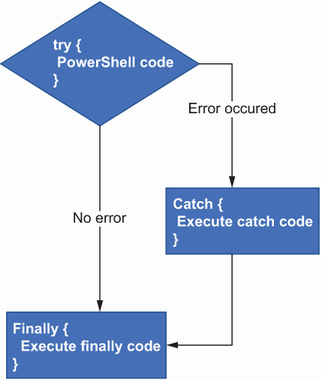
This flow diagram distinguishes the error route through `catch` from the successful route, while showing that `finally` runs after both. section 6.1.1
Use `throw` deliberately in error-handling logic:
- Convert a command failure to a terminating error with `-ErrorAction Stop` when a `catch` block must handle it; a normal `Get-Service` failure is not necessarily terminating. section 6.1.1
- Inspect `$_` in `catch` to determine whether the captured error is expected. section 6.1.1
- Allow expected failures to be handled without stopping later work, such as continuing to process other services after one service fails. section 6.1.1
- Re-throw an unexpected captured error with `throw $_` so it is reported as a terminating failure. section 6.1.1
Failing a timed-out external process
When monitoring an executable started with `Start-Process -PassThru`, a loop can check `HasExited` while a stopwatch measures elapsed time. If the process exceeds its allowed runtime, stop it with `Stop-Process -Force`, then throw a message such as `The application did not exit in time`. The automation records the timeout as failure instead of waiting indefinitely. section 9.4.2
$RuntimeSeconds = 2
$ping = Start-Process -FilePath 'ping.exe' -ArgumentList
 'google.com','-n 10' -PassThru
$timer =  [system.diagnostics.stopwatch]::StartNew()
while($ping.HasExited -eq $false){
    if($timer.Elapsed.TotalSeconds -gt $RuntimeSeconds){
        $ping | Stop-Process -Force
        throw "The application did not exit in time"
    }
}
$timer.Elapsed.TotalSeconds
$timer.Stop()
The listing combines process monitoring, a runtime threshold, forced termination, and `throw` into a reusable timeout pattern. section 9.4.2


