A terminating error stops the current PowerShell operation or script unless it is handled. Use one when continuing would make an automation unsafe, ambiguous, or misleading. The decision is part of the automation’s design: define which conditions must halt work rather than allowing later commands to run against a bad state. section 2.1.1 section 11.3.3
Use `throw` after checking a condition that invalidates the operation. In an archive-path function, test whether the proposed ZIP file already exists. If it does, throw a terminating error instead of returning the path or allowing an archive to overwrite existing data. `Join-Path` supports constructing the candidate path reliably before that check. section 2.1.1
Figure 2.3 The automation process to ensure that you have a unique file name for the archive file each time the file cleanup automation runs
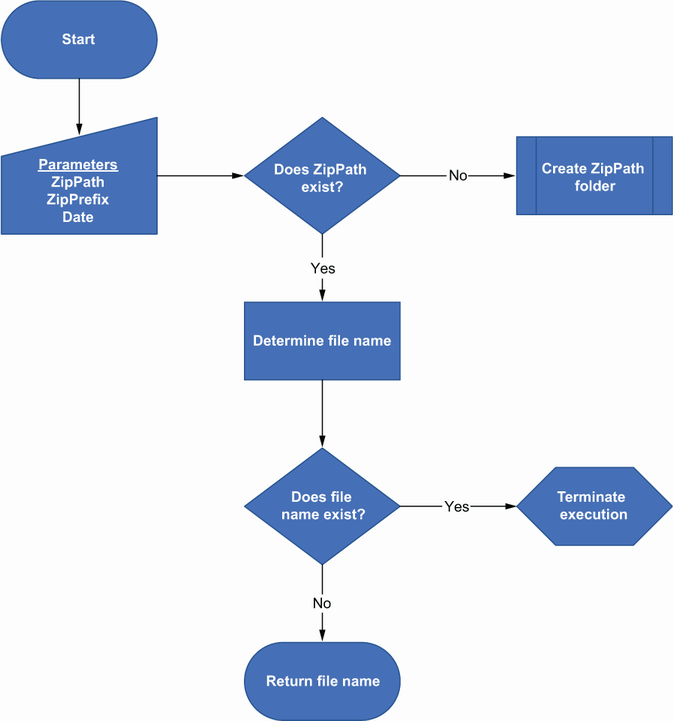
The process diagram maps the decision point where an existing archive name prevents the cleanup automation from proceeding. section 2.1.1
Choose a terminating error for conditions such as:
- A required output name already exists and reuse could overwrite data. section 2.1.1
- A uniqueness loop exceeds a deliberate retry limit, indicating that the condition needs investigation rather than unlimited retries. section 11.3.3
Fail safely while generating a site URL
A site-request automation can add numbers to a proposed URL until it finds an unused one. Set a maximum of 100 iterations. If the loop reaches that limit, throw a terminating error: the script stops rather than silently continuing with an unreliable result. After a valid URL is found, the automation can create the site and update the request status and URL. section 11.3.3
A terminating error is not merely a response to an unexpected crash. It is an explicit guardrail for known failure states. Place it immediately after the validation or loop limit that establishes the unsafe condition, so the reason for stopping remains close to the logic that detected it. section 2.1.1 section 11.3.3
