A simulation tick is one iteration of a D3 force simulation. During each tick, D3 calculates each node’s next position and velocity from the forces bound to the simulation, adding x, y, vx, and vy values to the node data. A tick callback then uses the updated positions to redraw the visual marks. This repeat-and-update cycle continues until the simulation converges on positions that satisfy the forces. section 12.4.1
Figure 12.9 When running a force layout simulation, D3 makes a series of real-time ticks, or iterations, where it calculates the position and velocity of each node according to the bound forces. We can then update the nodes’ positions in the tick’s callback function. The simulation stops once an optimal position has been found for each node.
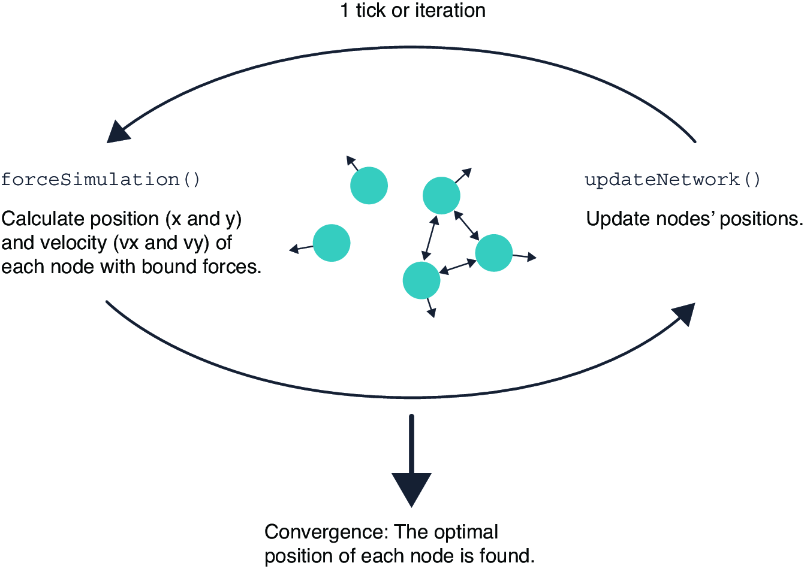
The cycle connects force calculations to visible movement: calculate node state, update marks in the tick callback, and stop when the layout reaches an optimal arrangement. section 12.4.1
Start by creating SVG circles for the nodes without setting their cx and cy attributes. Create an update function that selects those circles and assigns cx and cy from each node’s simulated x and y values. Then create a simulation with d3.forceSimulation(), provide its nodes, and register the update function for the "tick" event. The nodes move because every completed iteration invokes that function with newly calculated coordinates. section 12.4.1
Ticks make forces visible over time:
- Positioning forces such as d3.forceX() and d3.forceY() pull nodes toward horizontal or vertical target positions. section 12.4.1
- A collision force keeps nodes from overlapping by imposing a minimum distance between their centers. section 12.4.1
- Centering, many-body, link, and custom bounding forces can further shape the positions calculated at each tick. section 12.4.1
Updating a beeswarm during each tick
A beeswarm begins as one SVG circle per data item. A force simulation combines an x-force based on a value scale, a y-force toward zero, and a collision force. On every tick, the update function moves each circle to its current simulated coordinates. The result is a non-overlapping distribution whose horizontal placement represents the data values. section 12.4.1
A tick is not an axis tick. In a force layout, it is a simulation iteration; its practical role is to keep DOM positions synchronized with the evolving node data until the layout settles. section 12.4.1 section 4.1.2
