A timestamp is the time attached to an event record. Along with a key and value, it identifies when an event occurred and lets Kafka retain, process, and compare records over time. If a producer does not supply one, KafkaProducer uses the producer machine’s current system time. section 1.2 section 4.2.6
Choose timestamp semantics for the question the application must answer:
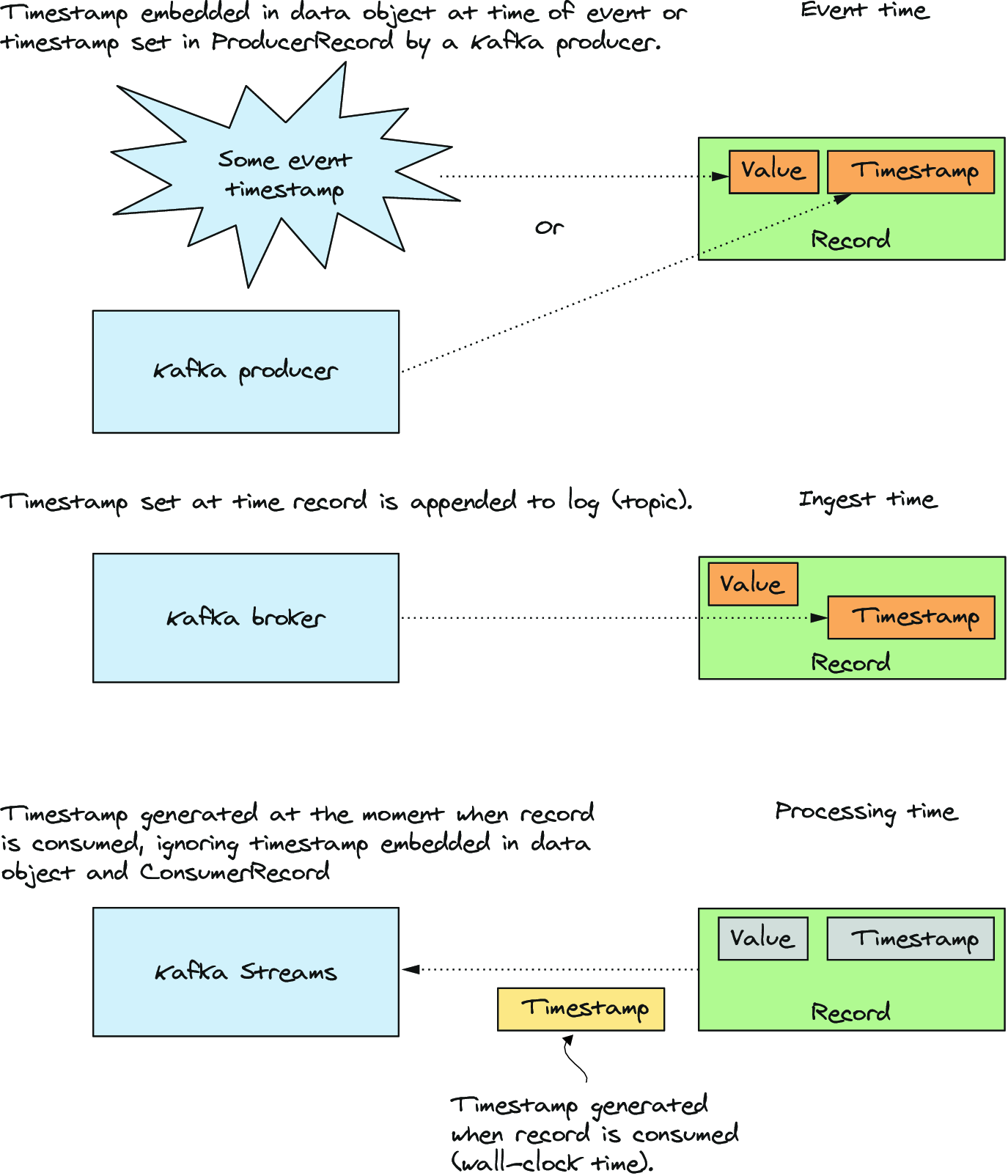
- Event time records when the event occurred; it can come from ProducerRecord metadata or a time field embedded in the value. section 9.4 section 11.2
- Ingestion time records when the broker appends a record, using the topic’s LogAppendTime setting. section 4.2.6 section 9.4
- Processing time records when a record begins flowing through a processing pipeline. section 9.4
- Normalize timestamps to UTC when clients and brokers might use different time zones. section 9.4
Topic configuration determines whether Kafka preserves the producer timestamp (CreateTime) or replaces it at append time (LogAppendTime). Timestamps also support retention: the broker compares a segment’s oldest timestamp with the current time and removes the segment after its configured retention period. section 4.2.6
In Kafka Streams, timestamps drive windows, stream joins, changelog updates, and Processor API punctuation. A TimestampExtractor selects the timestamp semantics used by a topology. Stream time is the highest timestamp the application has observed while processing. section 9.4 section 9.7
Use an embedded event time in ksqlDB
For fitness activity, use the event_time field rather than the producer timestamp when it better represents when a user entered activity on a mobile device. Declare timestamp = 'event_time'; add timestamp_format for a string field, or use a BIGINT event_time for epoch milliseconds. section 11.2
Bound a stream join by time
A 30-minute JoinWindows setting joins a coffee-stream record at 12:00 p.m. with a store-stream record timestamped from 11:30 a.m. through 12:30 p.m. Use before or after to narrow either side of that interval and express event order. section 7.3.4
Figure 9.33 There are three categories of timestamps in Kafka Streams: event time, ingestion time, and processing time.
Compare event time, ingestion time, and processing time before choosing a TimestampExtractor. section 9.4









