A timestamp associates an event with the time it occurred or entered a pipeline. It makes events operationally useful: teams can tell whether an issue is current, establish ordering, and distinguish possible causes from effects. Inputs can extract a timestamp from event content or assign the receive time. section 1.2.1
In Fluent Bit event handling, the timestamp travels separately from the tag and record. A Lua filter receives tag, timestamp, and record, then returns a status code with the timestamp and record. The default timestamp representation is a decimal seconds.nanoseconds value; a log field such as `time` remains ordinary record data unless an input uses it as the event timestamp. section 7.6.2 section 1.2.1
Treat timestamps as a configuration and capacity concern for time-based processing:
- Choose window durations with buffer capacity in mind. Sparse traffic can create empty windows, while incident surges can require more memory and otherwise risk data loss. section 8.4.3
- Keep sources on one time zone and avoid daylight-saving shifts in stream-processing timestamps. Preserve required local times as clearly named payload fields instead. section 8.4.3
- Align window intervals with event frequency. Millisecond precision and multithreaded scheduling can exclude events near a window boundary. section 8.4.1
Inspecting timestamps in a Lua filter
A Lua callback can accept `cb_addElementCount(tag, timestamp, record)` while changing only the record. Returning response code `2` tells Fluent Bit that the record changed and the timestamp did not. With `time_as_table: true`, a callback can inspect timestamp seconds and nanoseconds as separate values. section 7.6.2 section 7.6.2
Timestamp-sensitive hopping window
A dummy input emitting one event per second can feed a four-second hopping window advanced every two seconds. Small variations in event timestamps can change which records enter each sum, producing results that differ from the ideal count. section 8.4.1
Figure 8.2 Visualization of a sliding or hopping window in terms of how it sees the data
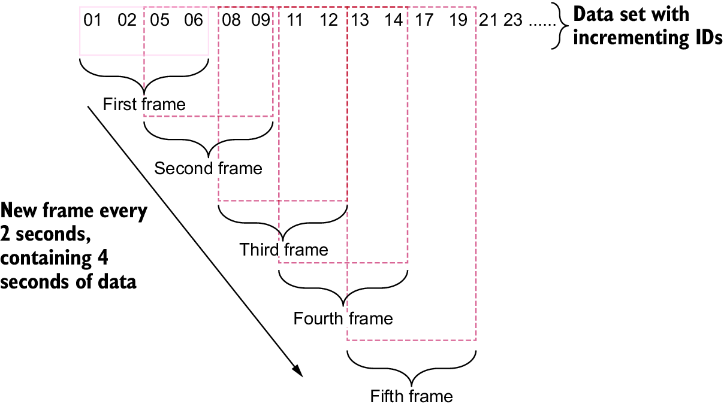
Use the window visualization to see why timestamp boundaries determine which events a hopping calculation includes. section 8.4.1









