torch.distributed is PyTorch’s submodule for coordinating distributed training across processes, GPUs, and machines. It helps use more hardware when a model or dataset makes training on one GPU impractical. section 16.0 section 1.5
A distributed program needs processes that can find one another and communicate. These terms make the setup easier to follow: section 16.1.1
Key terms
- World size is the total number of processes. With one GPU per process, it equals the number of GPUs. section 16.1.1
- Rank identifies a process within the world, from 0 to world size minus 1. A global rank identifies it across all machines; a local rank identifies it within one machine. section 16.1.1
- A node is a machine, physical or virtual. A process group is a collection of processes that can communicate; init_process_group creates one. section 16.1.1
Figure 16.1 Single GPU training (left) vs. multi-GPU training (center) vs. training with multiple machines and multiple GPUs (right)
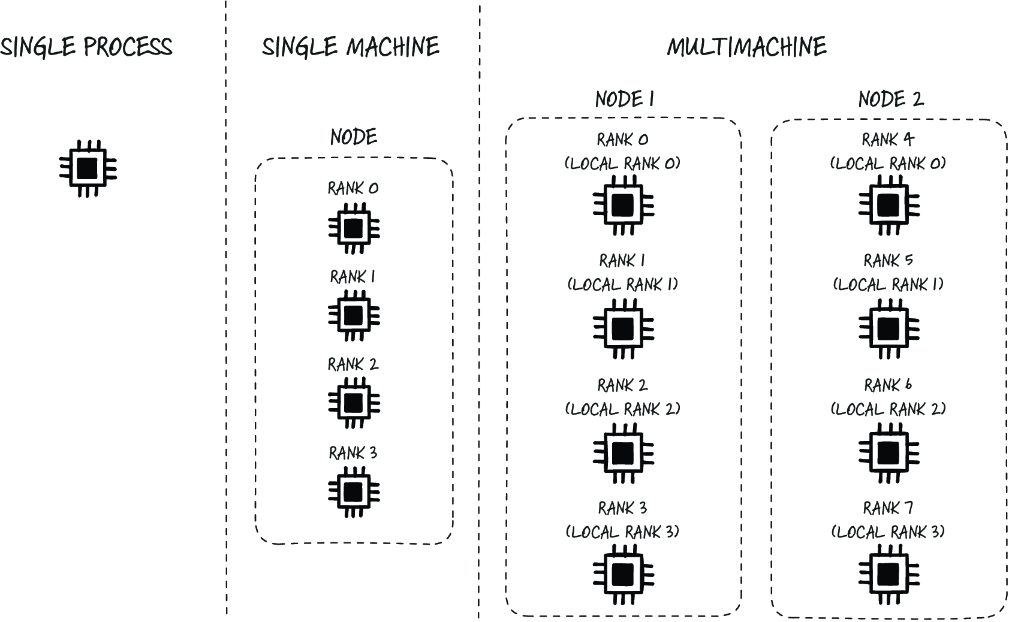
Compare a single GPU, multiple GPUs on one machine, and GPUs spread across multiple machines. section 16.1.1
To initialize a distributed program manually, torch.multiprocessing.spawn can start several processes running the same function. Each process then initializes a process group with its rank and the world size. A TCPStore can share the information needed to bootstrap communication; passing a store explicitly is optional. section 16.1.3
Listing 16.4 Initializing a process group
import torch.distributed as dist
import os
os.environ["MASTER_ADDR"] = "localhost"
os.environ["MASTER_PORT"] = "12355"

def init_process_with_store(rank, world_size, backend="gloo"):
    store = dist.TCPStore(
        host_name=os.environ["MASTER_ADDR"],
        port=int(os.environ["MASTER_PORT"]),
        world_size=world_size,
        is_master=rank == 0
    )
    dist.init_process_group(backend, store=store, rank=rank, world_size=world_size)
This initialization function sets an address and port, creates a TCPStore, and uses it to initialize a process group with the gloo backend. section 16.1.3
Alternatively, torchrun launches the processes and supplies environment variables for bootstrapping. The program still calls init_process_group: in this example, each process reads its rank and world size from the environment. section 16.1.3
Listing 16.5 Using torchrun
# torchrun --nproc-per-node=4 3_torchrun.py    #1
import torch.distributed as dist
import os

def main():
    rank = int(os.environ["RANK"])
    world_size = int(os.environ["WORLD_SIZE"])
    print(f"{rank=} initializing")
    dist.init_process_group(backend="gloo", rank=rank, world_size=world_size)

if __name__ == "__main__":
    main()
Launch four processes with torchrun and initialize a gloo process group in each one. section 16.1.3
Multiple GPUs are typical, but CPU-only processes on one machine can also be used to experiment with distributed code, without necessarily achieving a speedup. Distributed API support on Windows is limited; Linux, macOS, or Windows Subsystem for Linux are recommended. section 16.1.2
Once processes can communicate, collective communication can synchronize gradients across devices. Distributed training can also use data, model, pipeline, tensor, or fully sharded data parallelism, with tools such as DeviceMesh for combining strategies. section 16.10