liveBook · Manning

Touchscreen

As explained in Design for Developers

A display that detects direct physical contact and uses it as an input mechanism.

A touchscreen makes direct physical contact the primary way users interact with a mobile interface. Designing for it means adapting controls, spacing, and placement to fingers and phone-handling habits. section 6.5.1

Design touch interfaces by:

  • Making buttons and other interactive elements large enough to tap comfortably. section 6.5.1
  • Leaving enough space between neighboring controls to prevent accidental taps, confusion, and frustration. section 6.5.1
  • Placing frequent actions within a natural thumb zone, such as reachable lower-screen navigation or a Back to Top control. section 6.5.1
Figure 6.27 Thumb zones for people holding a phone in their right hand. Consider how your users interact with your design and keep things in the Natural zone as much as possible.
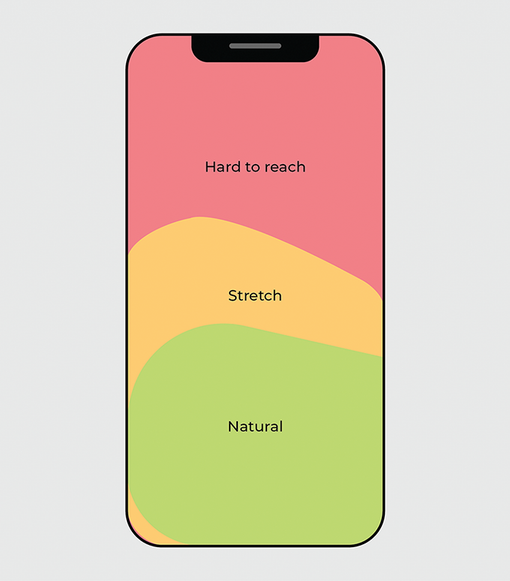
Use the thumb-zone diagram to evaluate whether important mobile actions sit where users can reach them naturally. section 6.5.1

How Design for Developers covers it

How deep it goes
Explains target sizing, spacing, and thumb-zone placement with practical examples, but does not specify measurements or implementation code.
Examples
Uses larger buttons, separated controls, lower-screen navigation, and a reachable Back to Top button as examples.
What it assumes
Assumes a mobile interface context while teaching touch-target and thumb-reach considerations directly.
What you can do after
Apply touch-target, spacing, and reachability decisions when adapting interfaces for mobile users.
How it connects
Links touchscreen interaction with mobile web design, interactive elements, touch targets, navigation, and thumb zones.

Related concepts

This explainer was generated by Manning's knowledge graph from the text of Design for Developers. The section links point to the parts of the book it draws on.