Trivial File Transfer Protocol (TFTP) transfers files between a client and server with a deliberately small feature set. Its common Cisco use is moving an IOS image from a file server to a router or switch during an upgrade. section 8.0 section 8.1
Use these facts to identify TFTP behavior and exam boundaries:
- Use a client read request to download a file or a write request to upload one. section 8.1.1
- Remember UDP port 69 for the initial request; TFTP supplies reliability through lock-step exchanges rather than TCP. section 8.1.1
- Expect ordered blocks, one acknowledgment per block, timers, and retransmissions when messages or replies are lost. section 8.1.1
- Avoid public-network transfers because TFTP provides neither authentication nor encryption; use it within a controlled environment such as a LAN. section 8.1
Cisco IOS represents storage locations as file systems. The opaque type supports internal functions such as system:, disk represents physical storage such as flash:, network provides access to remote systems such as tftp:, and nvram: stores startup-config. Use show file systems to identify types and defaults, dir to inspect a location, and more to display a file. section 8.1.2 section 8.4
Copy an IOS image from TFTP to flash
SW1# copy tftp: flash: Address or name of remote host []? 192.168.1.224 Source filename []? C2960c405-universalk9-mz.152-7.E7.bin Destination filename [c2960c405-universalk9-mz.152-7.E7.bin]? Accessing tftp://192.168.1.224/C2960c405-universalk9-mz.152-7.E7.bin... [OK – 18179072 bytes] 18179072 bytes copied in 200.831 secs (90519 bytes/sec) The first prompt identifies the TFTP server, the second names the remote file, and the third supplies its local filename. Verify the result with show flash:; the new image should appear alongside the currently used image. section 8.1.2
Figure 8.1 Transferring an IOS image to a network device with TFTP. (1) Download the IOS image from Cisco’s website via HTTPS. (2) Transfer the image to the network device via TFTP.
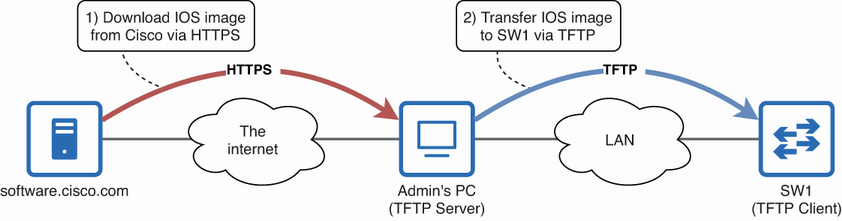
Follow the transfer path from a secure HTTPS download to the administrator’s PC, then from that PC to the network device through TFTP. section 8.1

