A voice query interface accepts spoken questions about structured data, converts them into executable SQL queries, and displays the resulting answers. section 7.3 section 7.3.2
It makes data analysis more convenient when typing is impractical. For example, you can ask how many games Activision sold in 2023 or how many games belong to each genre. section 7.3 section 7.3.2
For each spoken question, the interface:
- Records audio from the microphone and transcribes it into text. section 7.3.2 section 7.3.4
- Combines the transcript with the database schema so a language model can generate an SQL query. section 7.3.2 section 7.3.4
- Executes the query with SQLite and displays the result or an error message. section 7.3.2 section 7.3.5
A practical implementation uses Python libraries for OpenAI services, audio recording, WAV processing, SQLite access, and timing. It can save recordings as WAV files, which helps diagnose silence, background noise, or poor audio quality. section 7.3.4
Querying a games database
After starting the interface with a games.db database, ask, “How many games were released for each genre?” The system can show the transcribed question, generate a grouped SQL query, and return counts such as Action, Adventure, and Sports. Check the transcript, SQL, and result before trusting the answer. section 7.3.5
Figure 7.1 Our voice query interface transcribes spoken questions into text, translates text questions into SQL queries, and finally processes those queries and displays the query result.
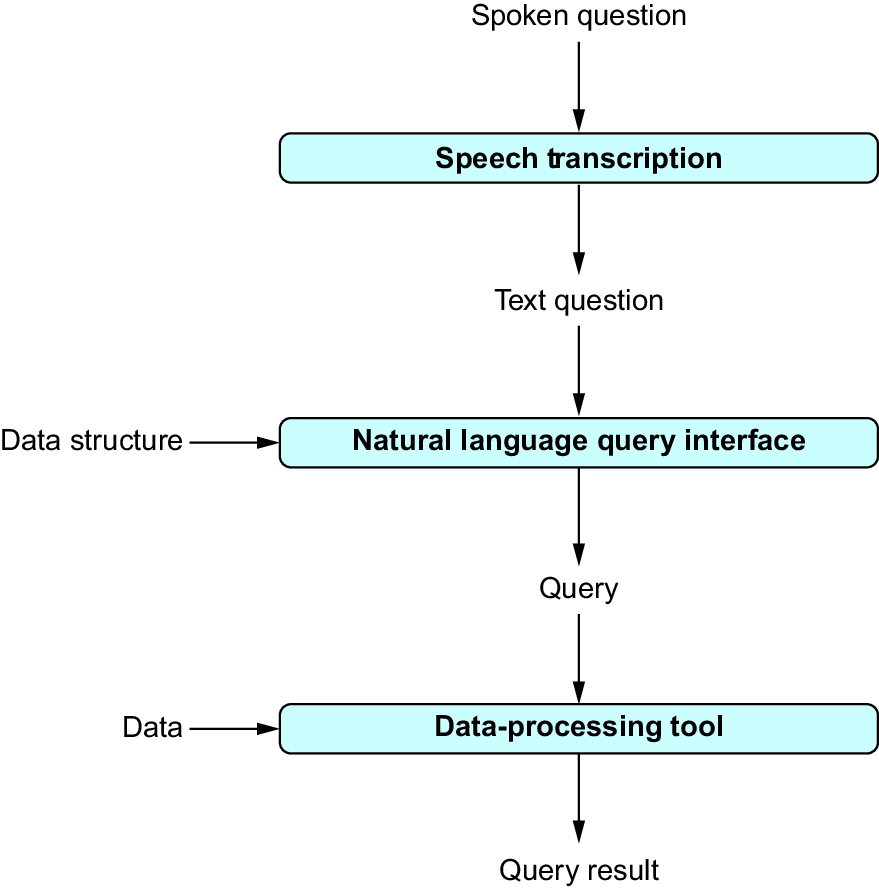
Trace the interface visually from spoken input through transcription and SQL translation to query execution and displayed results. section 7.3.2
