A tuple keeps separate objects in a fixed order. Unlike a string, which is a sequence of characters, a tuple can hold whole names, numbers, Boolean values, or even other tuples. Use one when you want to keep related values together. section 10.0 section 10.1 section 25.1
Make a tuple
`heroes = ("Spiderman", "Batman", "Superman")` stores three names as three objects, so you do not need to find where each name starts and ends in a string. Commas separate the objects. An empty tuple is `()`; a one-object tuple is `("Spiderman",)`. That last comma matters: `("Spiderman")` is just a string in parentheses. section 10.0 section 10.1
Work with a tuple much as you work with a string:
- Count its objects with `len((3, 5, "7", "9"))`, which gives `4`. section 10.2
- Get an object with square brackets. In `(3, 5, "7", "9")[1]`, index `1` gives `5` because counting starts at `0`. section 10.2
- Slice a tuple using the same rules as string slicing. If an object is another tuple, further brackets can reach inside it. section 10.2
Reach inside a nested tuple
`(3, (3, ("5", 7), 9), "a")[1][1][1]` gives `7`. The first `[1]` selects `(3, ("5", 7), 9)`; the next selects `("5", 7)`; the last selects `7`. Follow one pair of brackets at a time. section 10.2
Figure 10.1. The structure of the tuple (3, (3, ("5", 7), 9), "a"). The dashed lines indicate separate objects in the tuple.
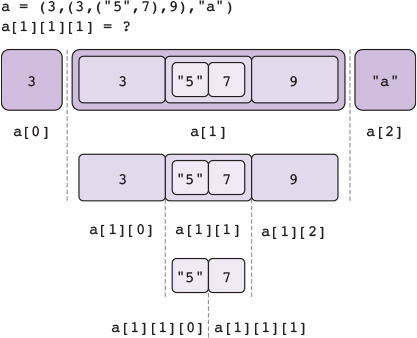
The diagram separates the objects at each level of the nested tuple, making the three indexing steps easier to follow. section 10.2
A tuple cannot be modified in place. To keep changing a collection by adding, removing, or modifying its elements, use a list instead. Tuples suit data that is more or less fixed, such as a coordinate pair or a page-and-line location. section 25.1
Swap two values
With `long = "hello"` and `short = "hi"`, write `(short, long) = (long, short)`. Afterward, `short` refers to `"hello"` and `long` refers to `"hi"`. Tuples let you make the exchange in one assignment. section 10.2 section 10.3
Tuples also help organize larger tasks: separate tuples of names and phone numbers can keep each friend’s details at matching indices. A tuple can even serve as one dictionary value when that value needs to contain multiple objects. For practice, predict `len(((1, 2),))` before trying it in Python. section 23.1 section 27.1 section 10.2














