A type 1 hypervisor runs directly on physical hardware and manages CPU, RAM, storage, and other resources for multiple virtual machines. This architecture breaks the one-to-one relationship between a server and its operating system, improving utilization in data centers and cloud environments. section 17.1.1 section 17.4
Identify a type 1 hypervisor by these characteristics:
- Call it a bare-metal hypervisor or native hypervisor because it is installed on the underlying hardware. section 17.1.1
- Use it to run multiple guest operating systems as isolated virtual machines on one physical server. section 17.1.1 section 17.4
- Expect efficient hardware use because the hypervisor interacts with physical hardware without a host operating-system intermediary. section 17.1.1
- Distinguish it from a type 2 hypervisor, which runs as an application on a host operating system. section 17.1.1 section 17.4
Each virtual machine can operate as an independent network host with a virtual NIC. A virtual switch forwards frames among virtual NICs and physical NICs, and its ports can use access or trunk mode for VLAN segmentation. section 17.4
Data-center deployment
A physical server can run a type 1 hypervisor that allocates its hardware resources among several virtual machines. VMware ESXi and Microsoft Hyper-V are common examples. section 17.1.1
Figure 17.4 A type 1 hypervisor runs directly on the server hardware.
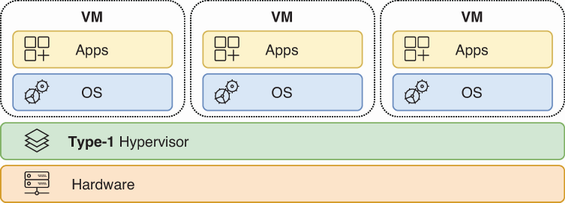
Visualize the direct hardware-to-hypervisor-to-VM relationship that distinguishes a type 1 hypervisor. section 17.1.1
