A type 2 hypervisor, or hosted hypervisor, runs as an application on a host operating system installed on physical hardware. It manages CPU, memory, storage, and other hardware resources for guest operating systems running in virtual machines. section 17.1.1
Key operational characteristics include:
- Separates the host OS from guest OSs: the host OS runs directly on the hardware, while each guest OS runs inside a virtual machine. section 17.1.1
- Uses hardware less efficiently than a type 1 hypervisor because the host OS provides an additional software layer. section 17.4
- Favors ease of setup and use, making it common on personal devices for software development, testing, and education. section 17.4
- Provides each VM with a virtual NIC and uses a virtual switch to forward traffic between VMs and the host’s physical NICs. section 17.4
- Supports access and trunk behavior on virtual-switch ports, allowing VLAN segmentation between virtual machines. section 17.4
Desktop virtualization lab
A developer installs Oracle VM VirtualBox or VMware Workstation on a personal computer, then runs multiple guest operating systems for development, testing, or education. The VMs communicate through virtual NICs and a virtual switch. section 17.1.1 section 17.4
Figure 17.5 A type 2 hypervisor runs as an application on a host OS.
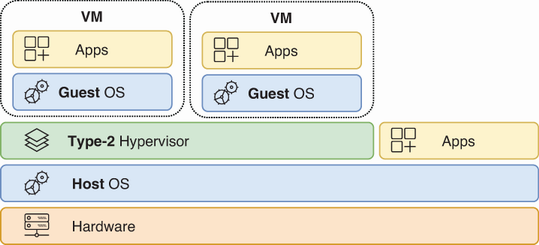
Visualizes the defining placement of a type 2 hypervisor as an application running on a host OS. section 17.1.1
