UI design structures an application's visual elements and interaction behavior around a real user need. Start by turning the app concept into requirements, then work backward from the experience users should have. section 3.0
A practical UI-design workflow is:
- Define what users must enter, choose, and receive. section 3.0
- Sketch the intended experience with pen and paper, a whiteboard, or drawing software. section 3.4.1
- Implement the design with available interface elements, then adjust it when practical constraints or better options appear. section 3.4.1
Unit converter mock-up
A unit converter can begin with a numeric input, a category selector, two unit selectors, and a Convert button. The category limits both unit lists to relevant choices, and the converted answer appears below. The sketch need not be polished; it should make the intended user outcome visible before coding. section 3.4.1
Figure 3.2 A mock-up of the unit conversion app
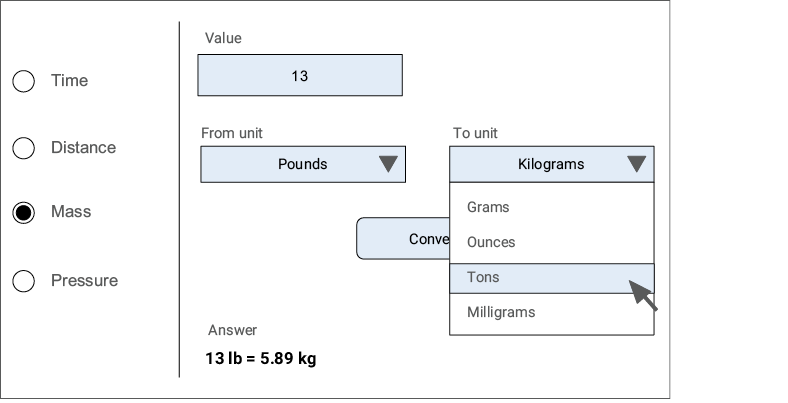
Use the mock-up to inspect the proposed arrangement of inputs, selectors, action, and result before implementation. section 3.4.1


