Read a number when the form is submitted
Give the input a name and an initial value, but no value prop or change handler: function NaturalSum() { const [sum, setSum] = useState(0); function onSubmit(evt) { const n = evt.target.elements.operand.valueAsNumber; setSum((n * (n + 1)) / 2); evt.preventDefault(); } return <form onSubmit={onSubmit}> <input type="number" min="1" name="operand" defaultValue="1" /> <button>Submit</button> <div>Sum: {sum}</div> </form>; } The browser keeps the input’s current value. React stores only the calculated result. section 9.3
In an uncontrolled form, the DOM holds each input’s current value rather than React state. React can supply an initial value with defaultValue, but it does not control what appears after the user starts typing. Read a named input during submission through evt.target.elements.name, or read an input through a ref. Do not set its value prop to make it uncontrolled. section 9.1 section 9.3
Figure 9.2 The flow of data in controlled versus uncontrolled inputs differs in the fact that React doesn’t control the value after the input has been rendered. Action 5.a highlights React’s control over the input even after the user interacts with it—React can intercept updates and change them on the fly or even ignore them. In the uncontrolled input on the bottom, React has no such control, and whatever the user enters will be displayed in the input.
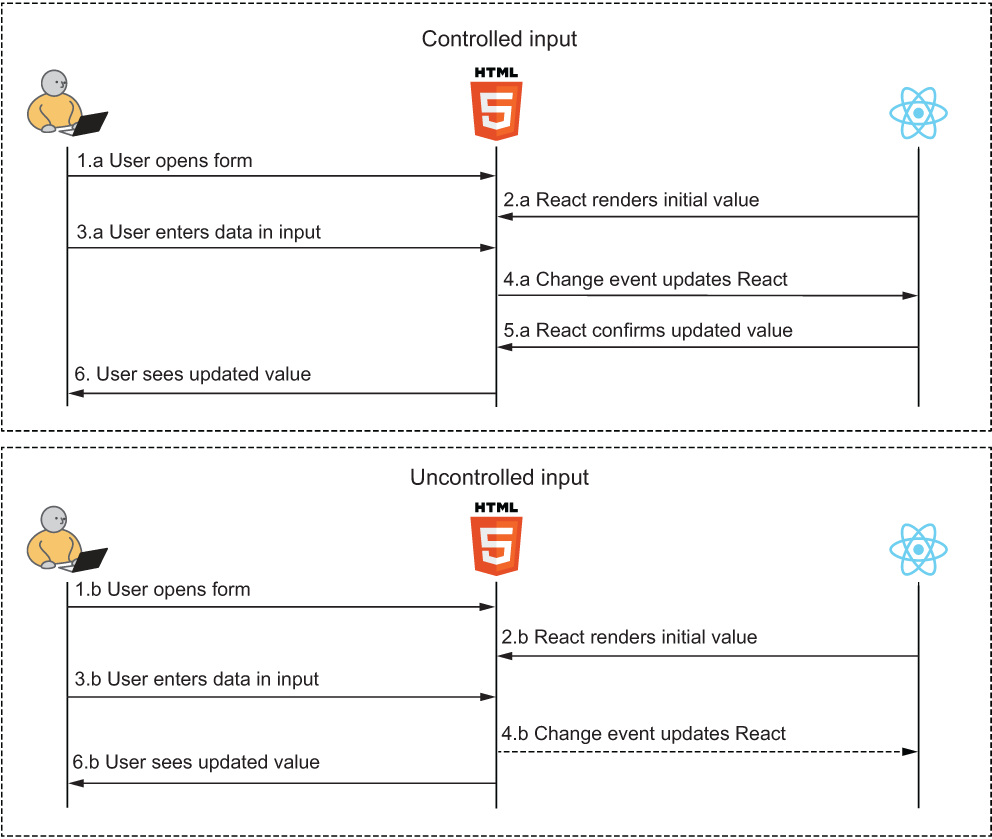
The data-flow diagram shows the key distinction: React can choose either input’s initial value, but only a controlled input remains under React’s control after user interaction. section 9.1
Choose this pattern when values matter mainly at submission and you do not need to filter, format, or replace input as the user types. A controlled input is the usual recommendation for that ongoing control. Uncontrolled inputs can instead eliminate per-input state and change handlers, though the submit handler must collect values from DOM elements. section 9.0 section 9.3.1
Listing 9.16 Uncontrolled address form with submit
const URL = "//salespower.invalid/api/address";
function Address() {
  const onSubmit = (evt) => {                           #1
    const data = Object.fromEntries(                    #1
      Array.from(evt.target.elements)                   #1
        .slice(0, 6)                                    #1
        .map((input) => [input.name, input.value])      #1
    );                                                  #1
    fetch(URL, {                                        #1
      method: "POST",                                   #1
      body: JSON.stringify(data),                       #1
    });                                                 #1
    evt.preventDefault();                               #1
  };                                                    #1
  return (
    <form
      onSubmit={onSubmit}                               #2
      style={{ display: "flex", flexDirection: "column" }}
    >
      <label>
        Address line 1:
        <input name="address1" />
      </label>
      <label>
        Address line 2:
        <input name="address2" />
      </label>
      <label>
        Zip:
        <input name="zip" />
      </label>
      <label>
        City:
        <input name="city" />
      </label>
      <label>
        State:
        <input name="state" />
      </label>
      <label>
        Country:
        <input name="country" />
      </label>
      <button>Submit</button>                           #3
    </form>
  );
}
export default Address;
The address-form listing collects named input values from the form’s elements collection, builds an object, and submits it without input state or change handlers. section 9.3.1
File inputs are a necessary exception to the usual preference for controlled inputs: browser security prevents code from setting a selected filename. A file input must therefore be uncontrolled; its selection can be read after the user chooses a file. section 9.3.2

