Usability anchors system building in the people, tasks, and conditions the system must support. Building automation before understanding those constraints can waste money and time. section 9.4.3
For ML-enabled interfaces, make usability an explicit delivery checklist:
- State what the system can and cannot do, and how well it works. section 9.4.3
- Present contextually relevant information without unfair social, gender, or racial bias. section 9.4.3
- Support correction, editing, and shutdown when the system is wrong or fails. section 9.4.3
Interface failure
A hospital booking system ignored users who were older, unfamiliar with computers, ill, or disoriented. In the 737 MAX case, hidden MCAS activation and damaged sensors left pilots unaware and unable to understand the aircraft’s behavior. section 9.4.3
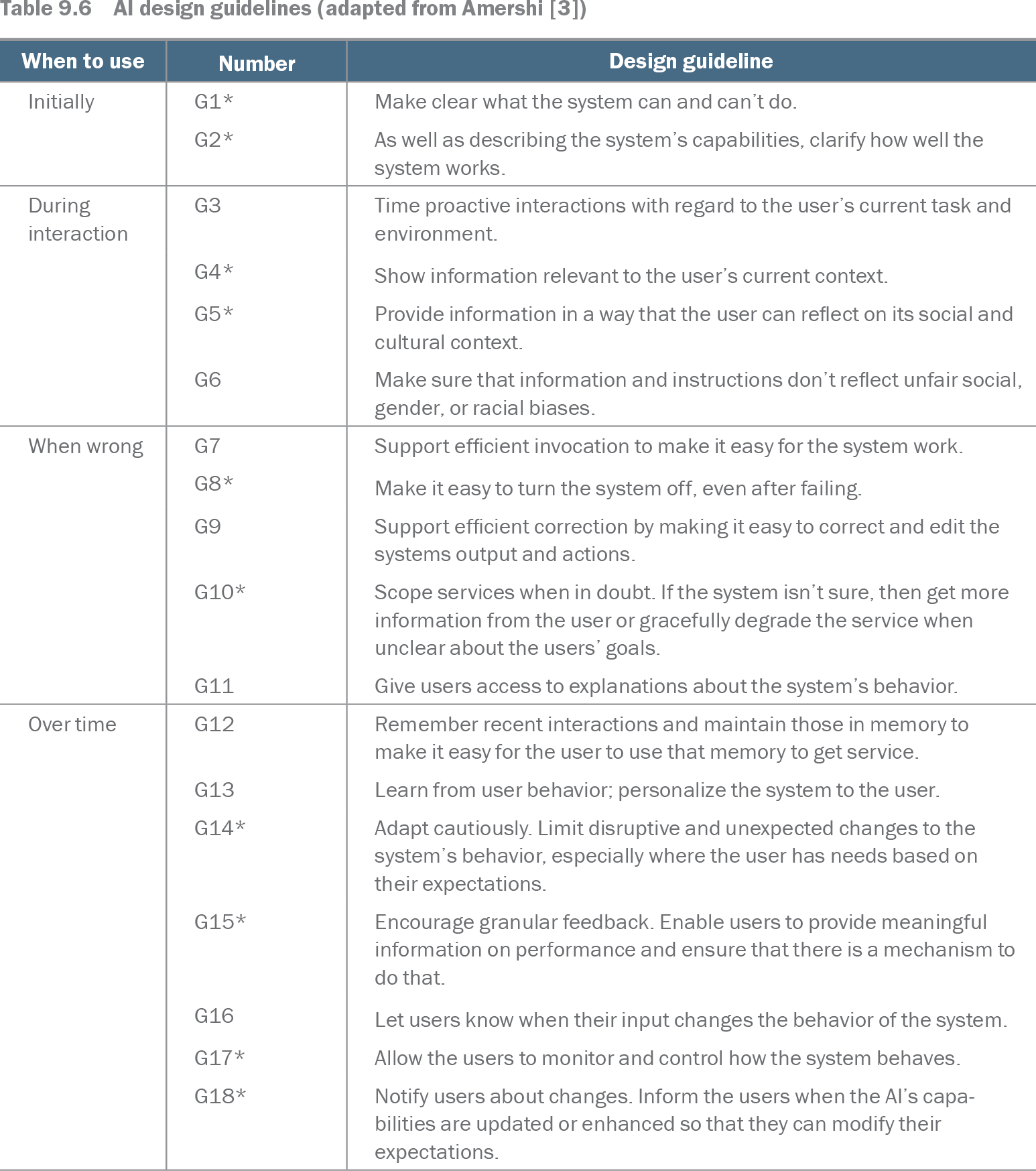
Table 9.6 AI design guidelines (adapted from Amershi [3]) (view table figure)
| Number |
Design guideline |
|
|---|---|---|
| Initially |
G1* |
Make clear what the system can and can’t do. |
| G2* |
As well as describing the system’s capabilities, clarify how well the system works. |
|
| During interaction |
G3 |
Time proactive interactions with regard to the user’s current task and environment. |
| G4* |
Show information relevant to the user’s current context. |
|
| G5* |
Provide information in a way that the user can reflect on its social and cultural context. |
|
| G6 |
Make sure that information and instructions don’t reflect unfair social, gender, or racial biases. |
|
| When wrong |
G7 |
Support efficient invocation to make it easy for the system work. |
| G8* |
Make it easy to turn the system off, even after failing. |
|
| G9 |
Support efficient correction by making it easy to correct and edit the systems output and actions. |
|
| G10* |
Scope services when in doubt. If the system isn’t sure, then get more information from the user or gracefully degrade the service when unclear about the users’ goals. |
|
| G11 |
Give users access to explanations about the system’s behavior. |
|
| Over time |
G12 |
Remember recent interactions and maintain those in memory to make it easy for the user to use that memory to get service. |
| G13 |
Learn from user behavior; personalize the system to the user. |
|
| G14* |
Adapt cautiously. Limit disruptive and unexpected changes to the system’s behavior, especially where the user has needs based on their expectations. |
|
| G15* |
Encourage granular feedback. Enable users to provide meaningful information on performance and ensure that there is a mechanism to do that. |
|
| G16 |
Let users know when their input changes the behavior of the system. |
|
| G17* |
Allow the users to monitor and control how the system behaves. |
|
| G18* |
Notify users about changes. Inform the users when the AI’s capabilities are updated or enhanced so that they can modify their expectations. |
Use the guideline table as a checkpoint matrix spanning initial disclosure, interaction timing and context, bias, correction, and shutdown. section 9.4.3