User-friendly data satisfies user needs, helps consumers find and interpret information, minimizes their work, and follows consistent conventions. In API design, it turns technically valid values into information developers can understand and use directly. section 8.2 section 8.10
Design data around these practical properties:
- Meet the consumer’s need without blurring concepts; for example, expose a search operation for available vehicles instead of embedding vehicles inside a shop resource. section 8.2.1
- Make information easy to find and interpret by using explicit names and grouping related properties, such as a location object containing latitude and longitude. section 8.2.2
- Reduce consumer effort by supplying ready-to-use supporting data, such as an address alongside coordinates when reverse geocoding would otherwise be required. section 8.2.3
- Apply the same names, formats, units, and structures consistently; intuitive representations let developers reuse experience and predict how data works. section 8.2.4
From machine code to usable information
A washing machine displaying {"ec":50400} forces users to decode a code and calculate a time. A message such as “Washing ends at 2:35 pm” communicates the result directly. Similarly, an API should avoid cryptic values and nonstandard formats when a clear, usable representation is possible. section 8.0
Figure 8.3 User-friendly data helps find and interpret information easily and limits consumers’ work.
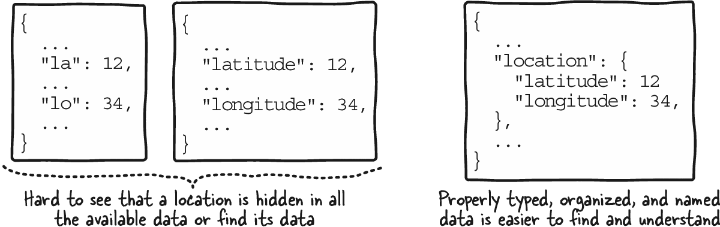
Compare scattered, cryptically named coordinates with an explicitly named location object to see how organization improves discovery and interpretation. section 8.2.2
Treat user-friendliness as a second data-modeling pass after confirming that the data fulfills user needs. Revisit names, formats, organization, granularity, and supporting data, then apply the same principles to paths, parameters, headers, requests, responses, and errors. section 8.3.2 section 9.1.2
