User Secrets keeps development passwords, connection strings, and API keys outside the project directory, reducing the chance that they enter source control. It is convenient for local ASP.NET Core development, but it does not encrypt values; production applications should generally use environment variables or a dedicated secret store. section 10.2.3 section 10.5
Set up and use User Secrets with these steps:
- Associate the project with a user-secrets identifier, either through the project file or with dotnet user-secrets init. section 10.2.3
- Store a value under a hierarchical configuration key, such as dotnet user-secrets set "MapSettings:GoogleMapsApiKey" F5RJT9GFHKR7. section 10.2.3
- Open Manage User Secrets from the development tooling to edit the local secrets file outside the project folder. section 10.2.3
- Let WebApplicationBuilder add the User Secrets provider automatically, or explicitly call AddUserSecrets<Program>() when the application is in development. section 10.2.3 section 10.5
Development-only secret loading
if (builder.Environment.IsDevelopment()) { builder.Configuration.AddUserSecrets<Program>(); } This loads the development secret provider without placing the secret in appsettings.json. For production, configure secrets through environment variables or another secret store instead. section 10.2.3 section 10.5
Figure 10.5 Choose Manage User Secrets to open an editor for the User Secrets app. You can use this file to store secrets when developing your app locally. These secrets are stored outside your project folder, so they won’t be committed to source control accidentally.
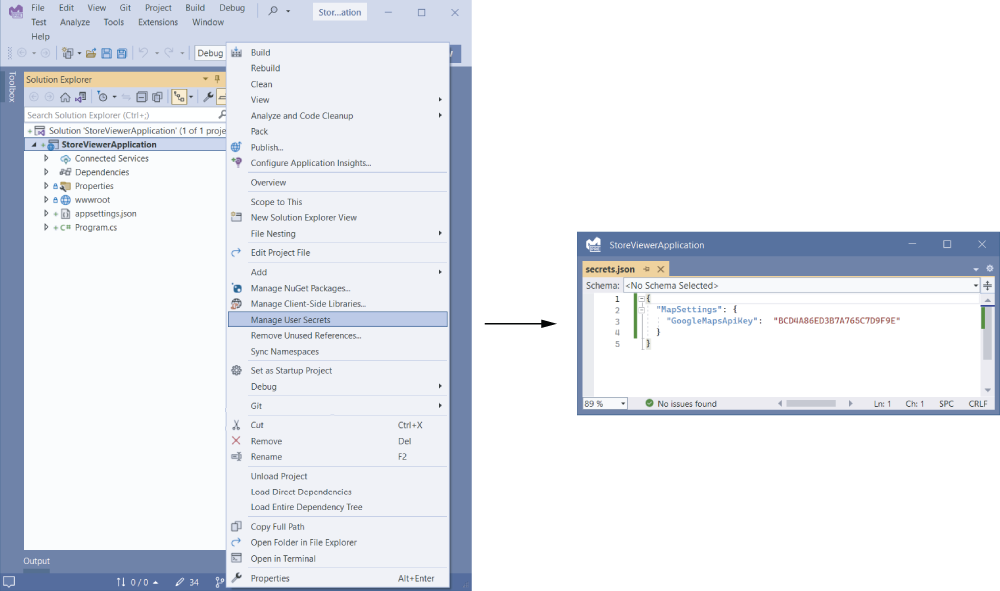
Use the figure to locate Manage User Secrets and see how the external secrets editor supports local development. section 10.2.3

