UserManager<T> is ASP.NET Core Identity’s service for managing application users. T identifies the class stored as a user; common applications use IdentityUser. Inject the service where account administration or startup seeding needs to create, query, update, or delete users. section 38.3 section 38.5
The most useful operations are:
- Read Users to enumerate accounts, or call FindByIdAsync(id) to retrieve one user. section 38.3 section 38.3.2
- Call CreateAsync(user, password) to persist a new account while Identity validates the password. section 11.1.6 section 38.3
- Call UpdateAsync(user) or DeleteAsync(user) to modify or remove an existing account. section 38.3
Enumerating accounts
A Razor Page can receive UserManager<IdentityUser> through dependency injection, iterate over Users, and render each user’s Id, UserName, and Email. A /users/list route can show an empty-state message until accounts exist, then expose edit and delete actions. section 38.3.2
Seeding an administrator
Startup code can resolve UserManager<IdentityUser> from a service scope, search for an Admin account, and create it with CreateAsync when absent. A hard-coded password is a deployment convenience, not a value to leave unchanged; Identity’s password policy still applies. section 11.1.6
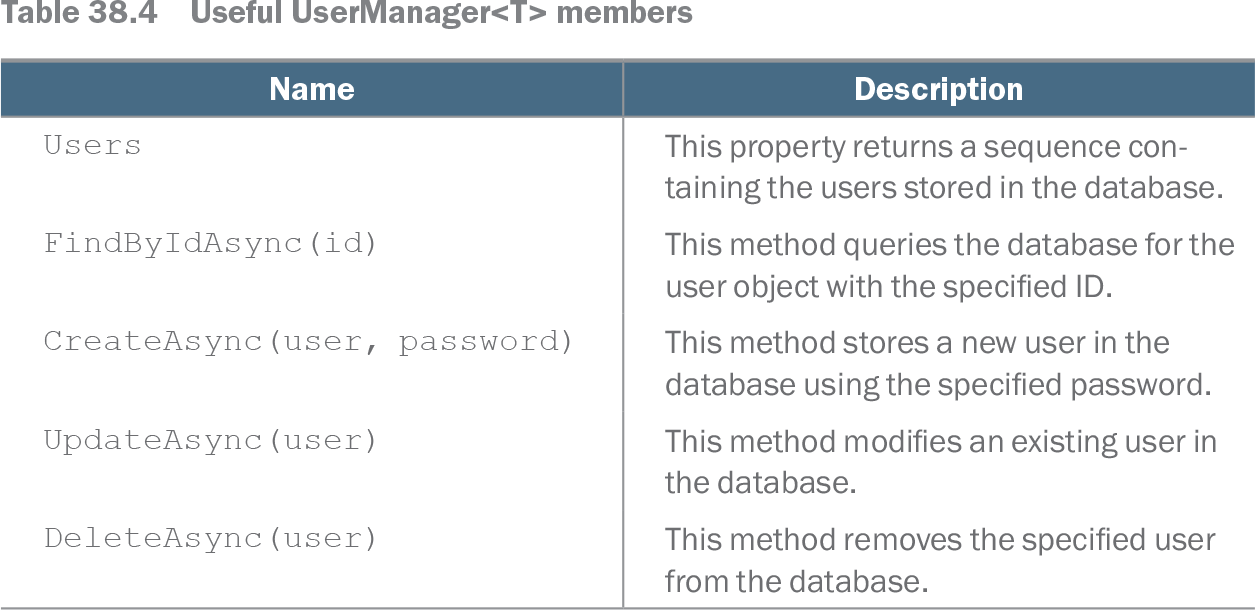
Table 38.4 Useful UserManager<T> members (view table figure)
| Name |
Description |
|---|---|
| Users |
This property returns a sequence containing the users stored in the database. |
| FindByIdAsync(id) |
This method queries the database for the user object with the specified ID. |
| CreateAsync(user, password) |
This method stores a new user in the database using the specified password. |
| UpdateAsync(user) |
This method modifies an existing user in the database. |
| DeleteAsync(user) |
This method removes the specified user from the database. |
Use this member reference to choose the appropriate account-management operation. section 38.3
Listing 38.11 The contents of the List.cshtml file in the Pages/Users folder in the Advanced project
@page
@model ListModel

<table class="table table-sm table-bordered">
   <tr><th>ID</th><th>Name</th><th>Email</th><th></th></tr>
   @if (Model.Users.Count() == 0) {
       <tr><td colspan="4" class="text-center">No User Accounts</td></tr>
   } else {
       foreach (IdentityUser user in Model.Users) {
           <tr>
               <td>@user.Id</td>
               <td>@user.UserName</td>
               <td>@user.Email</td>
               <td class="text-center">
                   <form asp-page="List" method="post">
                       <input type="hidden" name="Id" value="@user.Id" />
                       <a class="btn btn-sm btn-warning"
                           asp-page="Editor" asp-route-id="@user.Id"
                           asp-route-mode="edit">
                               Edit
                       </a>
                       <button type="submit"
                               class="btn btn-sm btn-danger">
                           Delete
                       </button>
                   </form>
               </td>
           </tr>
       }
   }
</table>

<a class="btn btn-primary" asp-page="create">Create</a>

@functions {

   public class ListModel : AdminPageModel {
       public UserManager<IdentityUser> UserManager;

       public ListModel(UserManager<IdentityUser> userManager) {
           UserManager = userManager;
       }

       public IEnumerable<IdentityUser> Users { get; set; }
           = Enumerable.Empty<IdentityUser>();

       public void OnGet() {
           Users = UserManager.Users;
       }
   }
}
Use this listing as a concrete Razor Pages pattern for displaying users and linking administration actions. section 38.3.2