A validation summary displays errors recorded while ASP.NET Core validates submitted form data. In a Razor view, put `<div asp-validation-summary="All" class="text-danger"></div>` in the form. The `ValidationSummaryTagHelper` processes the `asp-validation-summary` attribute and adds messages for recorded errors. `All` is a useful starting choice when users need to see why a form cannot be processed. section 29.3.1 section 3.2.9
The summary reports errors; it does not perform validation. Validation attributes can mark model properties as required, and the POST action can return the same view when `ModelState.IsValid` is false. Razor then has access to the request’s validation errors. With server-side validation, users see those messages only after submitting the form and receiving a response. section 3.2.9 section 9.3.6
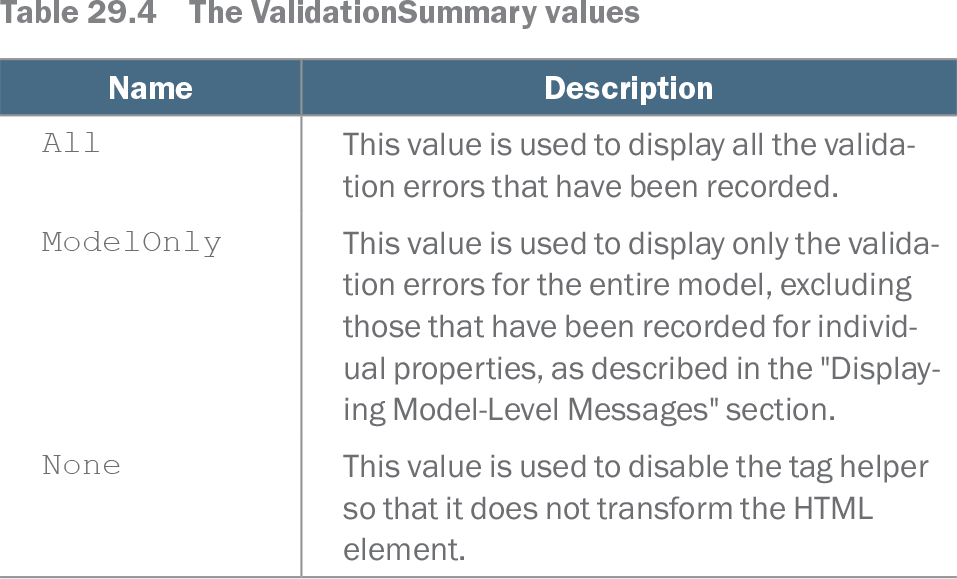
Choose the summary’s scope with a `ValidationSummary` value:
- `All` displays every recorded validation error, including errors for individual properties. section 29.3.1
- `ModelOnly` displays errors for the model as a whole and excludes property-level errors. section 29.3.1 section 29.3.5
- `None` disables the tag helper’s transformation of the element. section 29.3.1
A summary can identify the problem but leave users hunting for the offending field. For messages beside an input, add a `span` with `asp-validation-for="Name"`, changing the property name for each field. Those property-level messages can coexist with a summary. Take care with their placement: spans display inline, so a poorly placed message may not look connected to its input. section 29.3.4
Keep a cross-field error in the summary
Suppose a product name starts with `Small` and its price exceeds `100`. After confirming the individual properties have no validation problems, the POST action can record `ModelState.AddModelError("", "Small products cannot cost more than $100")`. The empty key makes this a model-level error. Set the view’s div to `asp-validation-summary="ModelOnly"` to show that rule in the summary while leaving field-specific messages beside their inputs. Submit `Small Kayak` with a price of `150` to observe the result. section 29.3.5
Table 29.4 The ValidationSummary values (view table figure)
| Name |
Description |
|---|---|
| All |
This value is used to display all the validation errors that have been recorded. |
| ModelOnly |
This value is used to display only the validation errors for the entire model, excluding those that have been recorded for individual properties, as described in the "Displaying Model-Level Messages" section. |
| None |
This value is used to disable the tag helper so that it does not transform the HTML element. |
Compare the three supported summary values before deciding whether the div should show all errors, only model-level errors, or no generated messages. section 29.3.1