A vector image describes shapes with math and geometry instead of a fixed grid of pixels. Unlike PNG and JPG raster images, it stays crisp when scaled to different sizes or screen resolutions. section 1.2.2
On the web, SVG makes vector graphics part of the DOM. Individual shapes can be styled, manipulated, animated, and exposed to screen readers; well-built SVG can also use less data than an equivalent raster image. section 1.2.2
SVG vector images are assembled from geometric elements with attributes for position, size, and presentation:
- Lines, rectangles, circles, ellipses, paths, and text form visible marks. section 1.2.2
- An SVG coordinate system positions elements, while fill, stroke, stroke-width, and related attributes control appearance. section 1.2.2
- A viewBox and responsive container let the same coordinate space scale across available widths. section 1.2.2
Shape gallery
Create an SVG with a 900 by 300 viewBox, then place a line, several rectangles, a circle, an ellipse, a curved path, and labels. Group related elements and use translate to move a grouped rectangle and its label together. section 1.2.2
Figure 1.8 Gallery of fundamental SVG shapes that we’ll build in this section
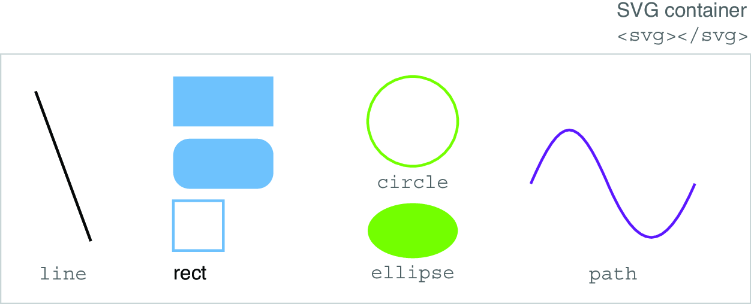
Browse the shape gallery to connect each SVG element type with its rendered result. section 1.2.2

