liveBook · Manning

Verb-noun naming format

As explained in Learn PowerShell in a Month of Lunches: Fourth Edition, Covers Windows, Linux, and macOS

Verb-noun naming is a command and script naming convention that combines an action verb with a descriptive noun.

Verb-noun naming combines a standard action verb, a dash, and a singular descriptive noun. PowerShell cmdlets use names such as Get-Command, Get-Content, Start-Process, and Set-VM. The consistent pattern makes unfamiliar commands easier to predict and verify with Help or Get-Command. section 4.4

Use the format precisely when typing commands:

  • Choose an approved verb such as Get, Set, New, or Pause; Get-Verb displays the available verbs. section 4.4
  • Add a dash, then a singular noun describing the object affected, such as Job, Process, Item, or Content. section 4.4
  • Type the dash exactly: Get-Content works, whereas Get Content, GetContent, Get=Content, and Get_Content do not. section 4.9.1

Naming a repeatable script

A disk-inventory script can be saved as Get-DiskInventory.ps1. Giving the script a cmdlet-style name signals its action and makes it resemble a reusable PowerShell command. section 19.2
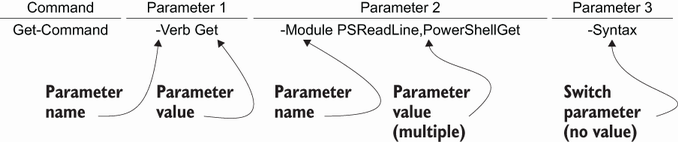
Figure 4.3 The anatomy of a PowerShell command

Use the command anatomy figure to see where the cmdlet name, parameters, values, switches, spaces, and dashes fit together. section 4.3


How Learn PowerShell in a Month of Lunches: Fourth Edition, Covers Windows, Linux, and macOS covers it

How deep it goes
Defines the naming rule and typing details, then applies it to a script name without developing noun standards.
Examples
Demonstrates Get-Command, Get-Content, Start-Process, Set-AzVM, and the Get-DiskInventory.ps1 script name.
What you can do after
Apply it via PowerShell to type valid names, predict unfamiliar commands, and name reusable scripts consistently.
How it connects
Connects standard verbs with cmdlets, functions, parameters, modules, scripts, and command discovery.

Also explained in

Compare how 3 books explain verb-noun naming format →

Related concepts

This explainer was generated by Manning's knowledge graph from the text of Learn PowerShell in a Month of Lunches: Fourth Edition, Covers Windows, Linux, and macOS. The section links point to the parts of the book it draws on.
