An SVG has a viewport—the visible frame—and a viewBox—the coordinate space inside that frame. The viewBox positions and scales the graphic so a responsive loader can grow or shrink with its container. section 3.2.2 section 3.2.3
Set the attribute with four values:
- Use viewBox="min-x min-y width height". section 3.2.3
- Set min-x and min-y to 0 to place the graphic's top-left corner at the viewport's top-left corner. section 3.2.3
- Choose width and height to contain the internal graphic; smaller viewBox dimensions zoom out, while larger dimensions zoom in. section 3.2.3
Responsive loading bars
For eleven bars that are each 60 units wide, separated by ten 5-unit gaps, use a 710-unit-wide coordinate space and a 300-unit height: <svg viewBox="0 0 710 300" width="100%" height="300px">. As the window changes size, the bars shrink or grow within the available width without becoming skewed. section 3.2.3 section 3.2.4
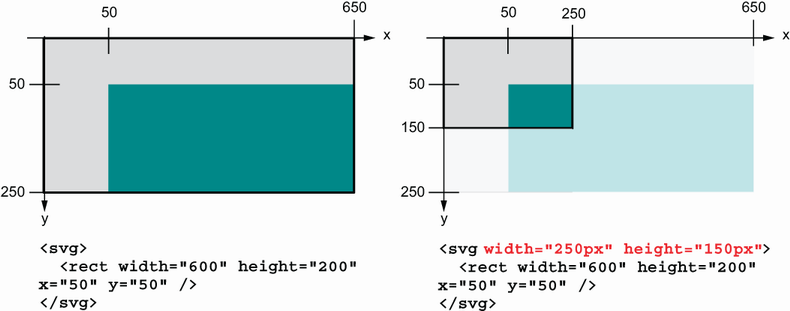
Compare SVGs with and without a defined viewport to see how the frame affects the graphic before adjusting its internal coordinate space. section 3.2.2

