A violin plot compares numeric distributions with mirrored curved areas. Its shape widens where a bin contains many observations and narrows where few occur, encoding more of the distribution than a box plot’s minimum, maximum, median, and quartiles. section 6.5 section 6.6
Build one violin per category by isolating its numeric values, calculating a mean, grouping values into bins, and calculating quartiles. A point scale positions categories, a linear y-scale positions values, and another linear scale converts bin counts into half-widths. section 6.5 section 6.5
Construct the shape progressively:
- Draw a histogram for each category first, using each bin’s value boundaries for height and its observation count for width. section 6.5
- Generate a half-violin area through the histogram-bar tips, using a smooth curve. section 6.5
- Mirror the area around the category’s center position to form the complete violin. section 6.5
- Add an interquartile-range line and a mean dot; a median marker is also a valid alternative. section 6.5 section 6.6
Comparing salaries by role
Five data-visualization roles—analyst, developer, designer, scientist, and leadership—are arranged along the x-axis. Each violin shows that role’s salary distribution, with a line from the first to third quartile and a dot at average salary. Roles with too few observations are excluded. section 6.5
Figure 6.17 Violin plots of the salary distribution of the five leading data visualization roles. Each plot is combined with a gray line extending from the first to the third quartile and a white dot positioned at the mean value.
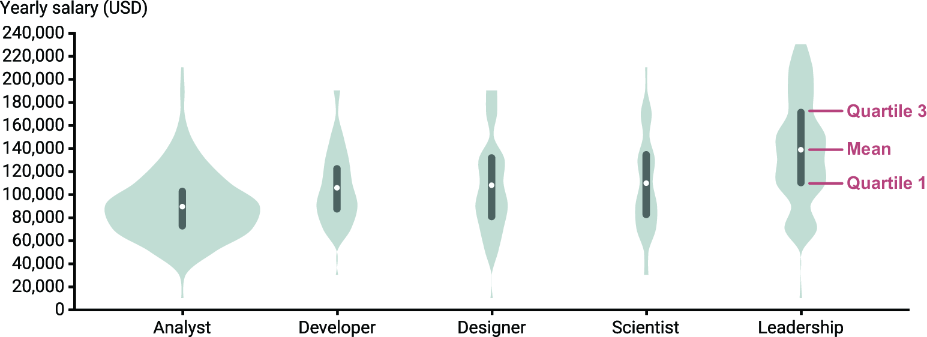
Inspect the completed comparison to see how the violin silhouette, interquartile-range line, and mean dot work together. section 6.5


