Visual hierarchy is the ordering of page elements that signals what matters most and where attention should go next. On the web, it helps people scan content, understand relationships, and find a starting point instead of facing a page where everything appears equally important. section 1.2 section 2.1.4
Hierarchy is not a decorative layer added at the end. It begins with a layout plan: a clear structure makes a page easier to navigate and gives later visual choices a coherent foundation. Visual design then adds character and emphasis through color, spacing, typography, and animation. section 1.2.1 section 2.0 section 1.3
Build hierarchy by making deliberate relationships between elements:
- Start with layout. Use structure and consistent proportions to create a page that feels defined rather than assembled as you go. section 2.0
- Use proximity, alignment, repetition, contrast, and balance to show which pieces belong together and which deserve emphasis. section 2.0
- Create strong contrast when an element needs attention. A difference that is too subtle may not give users a clear place to begin. section 2.1.4
- Treat typography, color, spacing, and animation as visual signals layered onto the underlying experience design. section 1.2 section 1.2.1
Making hero text readable
A common hierarchy failure is white text placed over a bright or busy hero image. The text may be hard to read and fail to stand out. Choose an image with a darker, less busy area behind the text, or add a treatment behind it. Avoid thin text over an image that does not provide enough contrast. section 2.1.4
Figure 2.32 Some white text over an image that doesn’t have enough contrast for the text to stand out
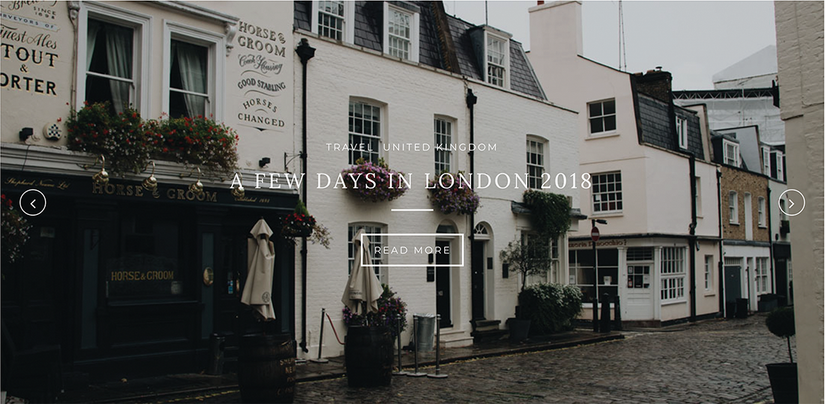
Compare low-contrast white hero text with an image background that does not give it enough separation. section 2.1.4
Figure 2.33 The photo chosen here has a much less busy background and is dark enough that the white text is brighter and more readable.

See how a darker, less busy image background makes white text brighter and easier to read. section 2.1.4
Contrast can direct attention through color, size, and differences in shape. A single unlike form among similar forms stands out; large type or bright type against a dark background can establish an intended viewing order. The goal is not merely visual interest, but a page people can scan and move through with less effort. section 2.1.4

The unlike diamond among circles demonstrates how contrast immediately pulls the eye. section 2.1.4
Use hierarchy early, including during wireframing. Wireframes act as layout blueprints, and design principles help establish the flow of a site and relationships between content before detailed visuals are added. This connects visual decisions to user experience, research, planning, building, testing, and iteration rather than treating appearance as separate from the product experience. section 2.2 section 1.2.1
A clear hierarchy also supports practical development work. Shared design vocabulary can improve communication with teammates or clients, help teams make feasible decisions earlier, and support a project-specific design system rather than unnecessary framework weight. Lighter code can improve browser performance and, in turn, user experience. section 1.3

