Visual hierarchy organizes elements so people notice the important things first and can follow a visualization’s story without hunting for it. In typography, hierarchy comes from contrast: a change that creates visual interest and pulls attention. section 5.4
Contrast can use color, form, spatial position, proximity, and symmetry. For text, form includes size, typeface, weight, and case. A large, bold callout is hard to miss; a quiet body label should stay quiet. The catch is wonderfully ruthless: when everything gets emphasis, nothing does. section 5.4.2 section 5.6
Build a readable hierarchy with a few deliberate moves:
- Make the starting point unmistakable. Give a main header or key callout more size or weight so it draws the eye first. section 5.4.2 section 8.4.3
- Use emphasis sparingly. Combining larger size with a heavier weight strongly attracts attention, so reserve it for genuinely important content. section 5.4.2
- Repeat styles for items with equal importance. Consistent font, size, and placement help readers learn the pattern across charts or dashboard components. section 5.4.5
- Let space do some of the talking. Extra white space can separate and elevate a callout, while close labels signal their association with a chart element. section 5.4.4
- Keep the baseline simple. A single typeface and limited style variation preserve consistency while leaving contrast available for meaningful differences. section 5.4
A pay-gap callout
A gender pay-gap visualization leads with a large title and callout, then a subtitle, chart labels, and finally smaller body text. The “$1.09” callout is both larger and bolder than surrounding text, making its importance immediate—but also illustrating why this level of emphasis should be rare. section 5.4.2
Figure 5.23 This is an interactive visualization I made in 2018 (direct link to viz: http://mng.bz/p1wE) using publicly available payroll data for employees of the State of Ohio. I used a single typeface, the Tableau typeface, throughout the visual to maintain consistency and simplicity, although I could have done a better job at keeping the number of fonts (styles) lower.
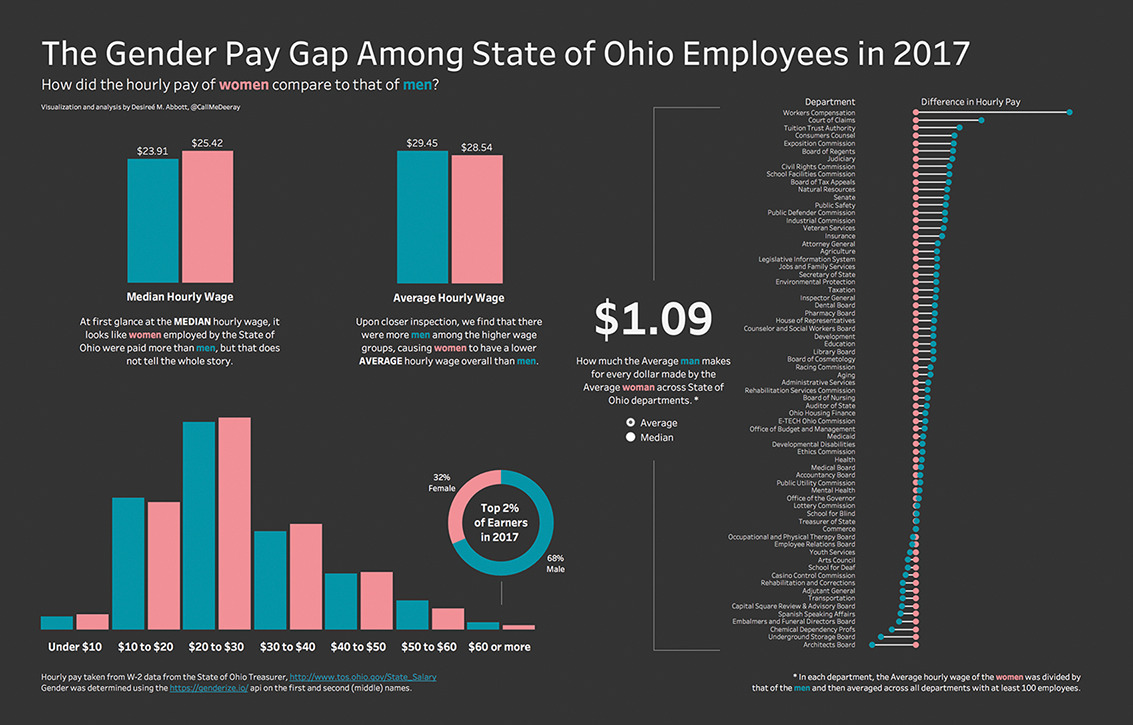
Inspect the payroll visualization as a whole: it uses one typeface for consistency while varying text treatments to establish what deserves attention first. section 5.4
Hierarchy is not a rigid demand for symmetry everywhere. Repeated patterns work well for recurring chart labels, but simple tooltips can emphasize only the information that matters in that moment while maintaining a consistent typeface and color. section 5.4.5 section 8.4.3

