VRF-lite segments one physical router into multiple isolated virtual routers, allowing separate customers or networks to use overlapping IP subnets without MPLS. section 17.2 section 17.4
Build a basic VRF-lite configuration in three steps:
- Create each VRF with ip vrf vrf-name in global configuration mode. section 17.2
- Assign interfaces with ip vrf forwarding vrf-name, then configure their IP addresses. section 17.2
- Configure routing for each VRF and verify its separate routing table. section 17.2 section 17.4
Each VRF has an independent routing table. Traffic remains inside its VRF and cannot exit through an interface assigned to another VRF; VRF leaking is the advanced exception. section 17.2 section 17.4
Configure and verify isolated routing
Use ip vrf C1_VRF, then assign an interface with ip vrf forwarding C1_VRF and re-enter its IP address because enabling VRF removes the existing IPv4 address. Verify with show ip vrf, show ip route vrf C1_VRF, and ping vrf C1_VRF destination. A plain show ip route does not display the VRF-specific routes. section 17.2
Figure 17.8 VRF segments a physical router into multiple virtual routers.
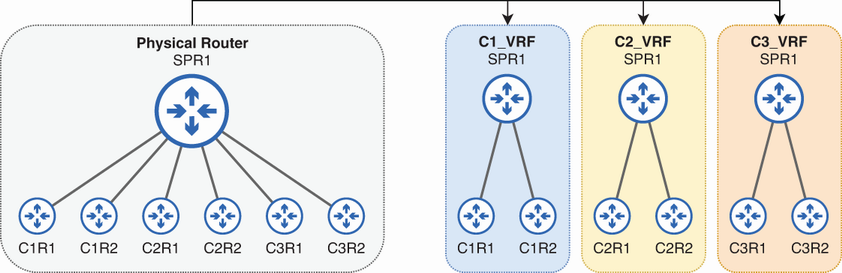
Use the router-segmentation figure to visualize one physical router operating as multiple virtual routers. section 17.2
Figure 17.9 SPR1 is divided into three VRFs. Because each VRF functions as an independent router, overlapping IP addresses are not a problem.
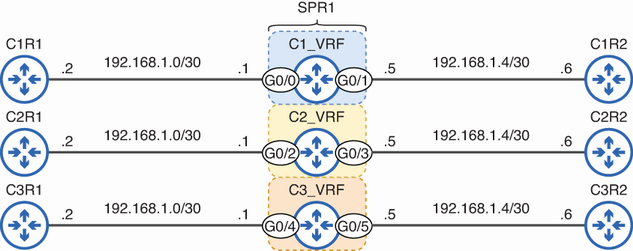
Use the three-VRF topology to see why identical or overlapping interface subnets can coexist across isolated VRFs. section 17.2
