A VTP domain groups LAN switches that share a VTP domain name and VLAN configuration information. Switches synchronize only with other switches in the same domain. By default, a switch has no domain name and is in domain NULL; it can change VLANs but does not send VTP messages. section 13.2.1 section 13.3
Configuring and verifying a domain
On SW1, configure `vtp domain Manning`, then create VLANs 2, 3, and 4. SW1 advertises the updated VLAN database through trunk ports. SW2 and SW3 join the Manning domain and synchronize when their revision number is lower. section 13.2.1
Figure 13.5 VLANs created on SW1 are propagated to other switches in the VTP domain “Manning.” (1) SW1 creates VLANs 2, 3, and 4, updating its revision number to 3 (incrementing by 1 each time it creates a VLAN). (2) SW1 sends VTP messages to other switches in the VTP domain. (3) SW2 and SW3 add VLANs 2, 3, and 4 to their VLAN databases, updating their revision number to match SW1’s.
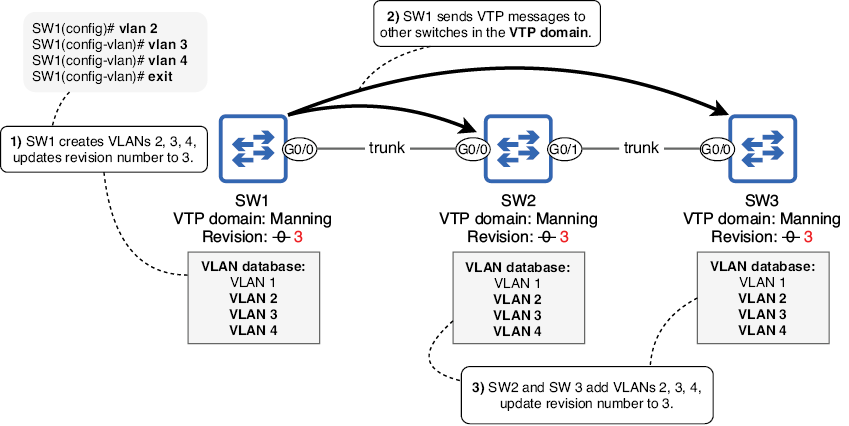
The diagram traces VLANs 2, 3, and 4 from SW1 to SW2 and SW3, including the revision-number changes. section 13.2.1
