VLAN Trunking Protocol (VTP) is a Cisco-proprietary protocol that synchronizes VLAN databases across switches. The database is stored in vlan.dat, and synchronization can reduce repetitive configuration and human error in large LANs. VTP messages travel only through trunk ports and only between switches in the same VTP domain. section 13.2 section 13.2.1
VTP synchronization follows the database revision number:
- Creating, deleting, or renaming a VLAN increments the revision number. section 13.2.1
- A switch advertises database changes through VTP messages, and another switch synchronizes when the advertised revision is higher. section 13.2.1 section 13.3
- A switch without a configured domain is in domain NULL; it can change VLANs but does not send VTP messages. section 13.2.1
- Use vtp domain domain-name to join a domain and show vtp status to inspect the domain, mode, version, and revision. section 13.2.1 section 13.3
Propagating VLANs
After SW1 joins the Manning domain, creating VLANs 2, 3, and 4 raises its revision to 3. SW2 and SW3 receive the advertisements and update their databases to revision 3, allowing the VLANs to exist across the LAN. section 13.2.1
Figure 13.7 SW4 is connected to the network and overwrites the VLAN databases of SW1, SW2, and SW3. (1) SW4 is connected to the LAN. (2) SW4 sends VTP messages to the other switches. (3) Because SW4 has a higher revision number (50 vs. 5), SW1, SW2, and SW3 synchronize their VLAN databases to match SW4. Hosts in VLANs 10, 20, and 30 will be unable to communicate over the network because their VLANs no longer exist.
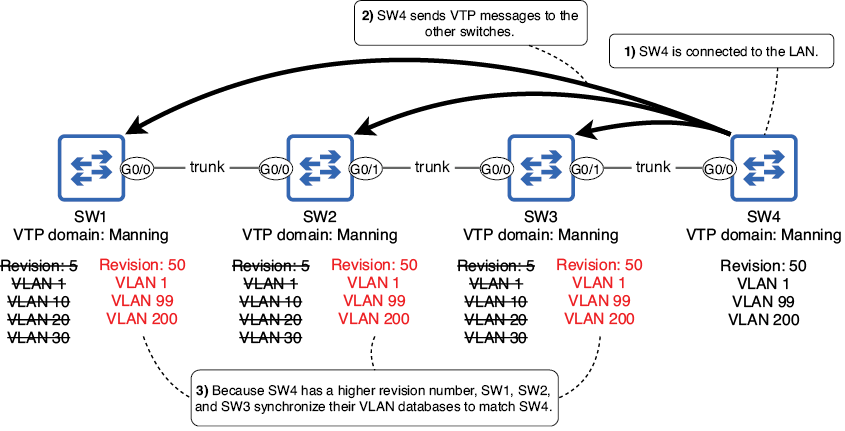
Visualize the major VTP failure mode: a newly connected switch with a higher revision can overwrite the VLAN databases of the existing domain. section 13.2.4
VTP can cause outages when a newly connected switch has a higher revision number and the same domain. Reset the revision to 0 before connection by changing the domain away and back; versions 1 and 2 also support temporary transparent or off modes. Version 3 adds off mode, extended-range VLAN support, and a primary server that alone can modify the VLAN database. section 13.2.4 section 13.2.3
