The VTP revision number is a counter for the latest version of a switch’s VLAN database. It starts at 0 and increases by 1 whenever a VLAN is created, deleted, or renamed. Switches in the same VTP domain use it to decide whether to synchronize VLAN information. section 13.2.1 section 13.3
Use these rules to interpret the revision number:
- A switch synchronizes to a higher revision number, but not to a lower or equal number. section 13.3
- Synchronization requires switches to share the same VTP domain; VTP messages travel through trunk ports. section 13.2.1
- Check the value with show vtp status, which displays the Configuration Revision field. section 13.2.1
- Reset a replacement switch to revision 0 before connecting it by changing its domain, or changing VTP mode where supported. section 13.2.4
Normal synchronization
SW1 creates VLANs 2, 3, and 4, raising its revision number from 0 to 3. It sends VTP messages, and SW2 and SW3 update their VLAN databases to revision 3. section 13.2.1
The dangerous high revision
A newly connected SW4 has revision 50 while the existing domain is at revision 5. Because 50 is higher, the other switches synchronize to SW4 and may lose VLANs 10, 20, and 30. section 13.2.4
Figure 13.5 VLANs created on SW1 are propagated to other switches in the VTP domain “Manning.” (1) SW1 creates VLANs 2, 3, and 4, updating its revision number to 3 (incrementing by 1 each time it creates a VLAN). (2) SW1 sends VTP messages to other switches in the VTP domain. (3) SW2 and SW3 add VLANs 2, 3, and 4 to their VLAN databases, updating their revision number to match SW1’s.
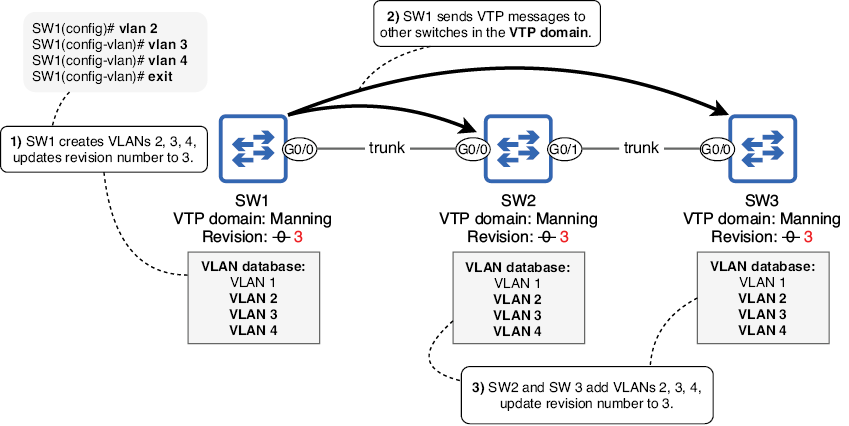
Trace how VLAN creation raises SW1’s revision number and propagates the VLAN database to switches in the Manning VTP domain. section 13.2.1
