VTP off mode disables VTP participation on a switch. The switch neither synchronizes its VLAN database nor advertises VLAN changes, and it does not forward VTP messages. section 13.2.2 section 13.3
A switch in off mode can still manage its local VLAN database:
- Create, modify, and delete VLANs locally. section 13.2.2
- Keep VLAN changes independent from other switches in the VTP domain. section 13.2.2
- Avoid forwarding VTP messages, unlike transparent mode. section 13.2.2
Configuration and version note
Configure the mode with the global configuration command vtp mode off. VTP version 3 introduced off mode, but switches capable of version 3 can use it while running version 1 or 2. section 13.2.2 section 13.2.3
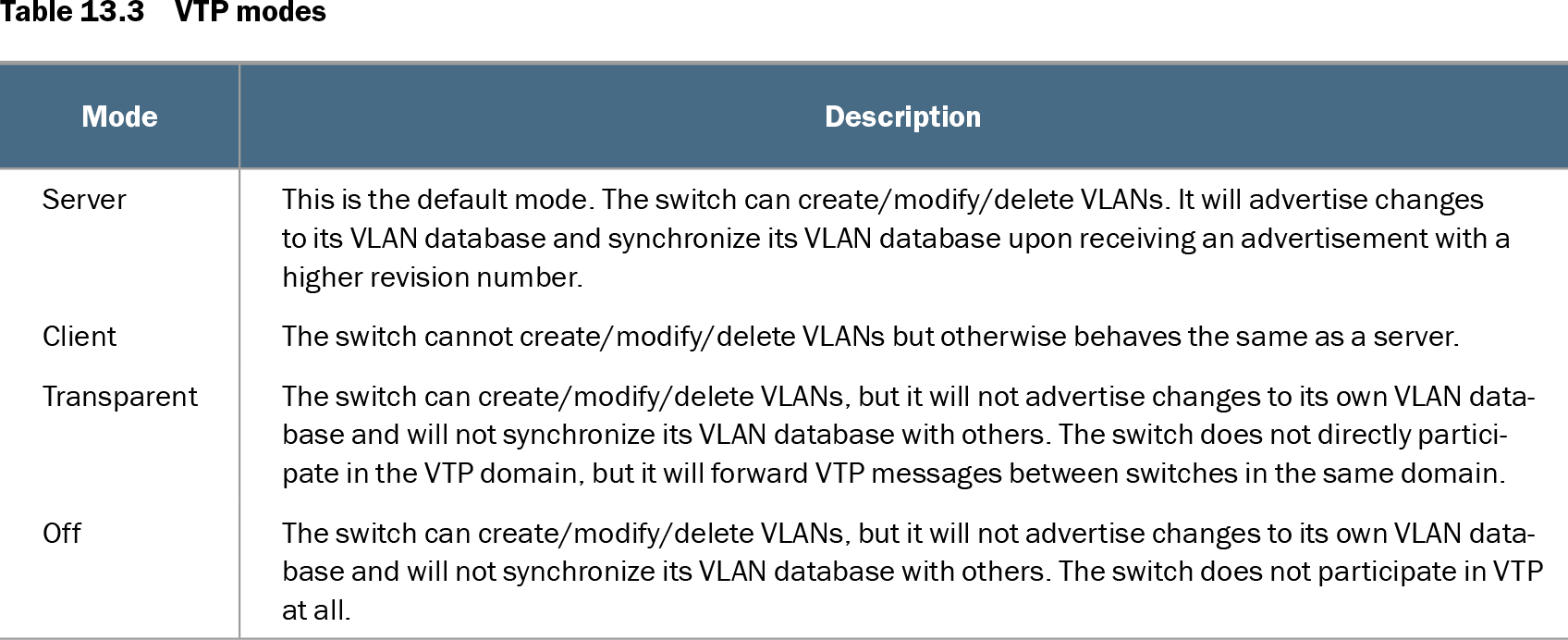
Table 13.3 VTP modes (view table figure)
| Mode |
Description |
|---|---|
| Server |
This is the default mode. The switch can create/modify/delete VLANs. It will advertise changes to its VLAN database and synchronize its VLAN database upon receiving an advertisement with a higher revision number. |
| Client |
The switch cannot create/modify/delete VLANs but otherwise behaves the same as a server. |
| Transparent |
The switch can create/modify/delete VLANs, but it will not advertise changes to its own VLAN database and will not synchronize its VLAN database with others. The switch does not directly participate in the VTP domain, but it will forward VTP messages between switches in the same domain. |
| Off |
The switch can create/modify/delete VLANs, but it will not advertise changes to its own VLAN database and will not synchronize its VLAN database with others. The switch does not participate in VTP at all. |
Compare off mode with server, client, and transparent mode by VLAN administration, synchronization, advertisement, and message forwarding. section 13.2.2