VTP server mode lets a switch create, rename, and delete VLANs, then advertise those VLAN database changes throughout the matching VTP domain. It is the default mode. section 13.2.2
Key behavior:
- Synchronizes its VLAN database when it receives an advertisement with a higher revision number. section 13.2.2
- Participates in synchronization only with switches using the same VTP domain name. section 13.3
- Differs from client mode because clients cannot create, modify, or delete VLANs. section 13.2.2
Configure and verify
Use `vtp mode server` to select server mode, `vtp domain DOMAIN_NAME` to join a named domain, and `show vtp status` to inspect the current state. A switch with no domain name remains in domain NULL and does not send VTP messages. section 13.3
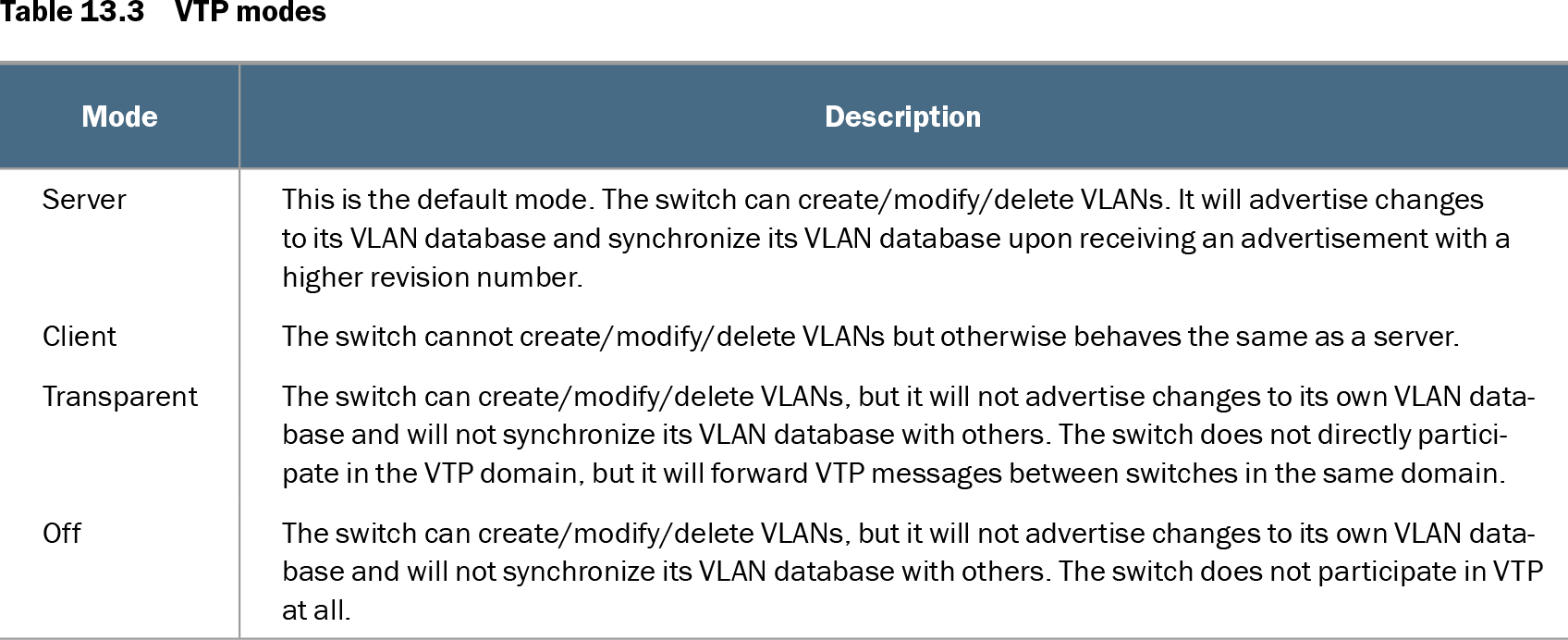
Table 13.3 VTP modes (view table figure)
| Mode |
Description |
|---|---|
| Server |
This is the default mode. The switch can create/modify/delete VLANs. It will advertise changes to its VLAN database and synchronize its VLAN database upon receiving an advertisement with a higher revision number. |
| Client |
The switch cannot create/modify/delete VLANs but otherwise behaves the same as a server. |
| Transparent |
The switch can create/modify/delete VLANs, but it will not advertise changes to its own VLAN database and will not synchronize its VLAN database with others. The switch does not directly participate in the VTP domain, but it will forward VTP messages between switches in the same domain. |
| Off |
The switch can create/modify/delete VLANs, but it will not advertise changes to its own VLAN database and will not synchronize its VLAN database with others. The switch does not participate in VTP at all. |
Compare server mode with client, transparent, and off modes before changing a switch’s VLAN-management behavior. section 13.2.2