Warm colors—red, orange, and yellow—often feel energetic, happy, or attention-grabbing. They appear more prominent and visually forward than cooler colors, making them useful when an interface needs focus or urgency. section 9.1.2
Use warm color deliberately:
- Use red to attract attention or communicate decline, warning, error, danger, or a strong negative state. section 9.1.2 section 9.3
- Use orange for visible warnings, activity, energy, creativity, or an adventurous tone. section 9.3
- Use yellow for caution, optimism, or focus, especially against a darker color; avoid overusing unpleasant or overwhelming variations. section 9.3
- Remember that temperature is gradual: warm colors can have cooler variations, cool colors can have warmer variations, and gray can trend either way. section 9.1.2
A button that comes forward
A red button on a blue background appears to sit on top of the composition. Swapping the colors makes the blue button feel more recessed, like it sits farther back. The same subtle effect can influence digital interfaces. section 9.1.2
Figure 9.4 The red button on the left visually appears more forward than the blue button on the right.
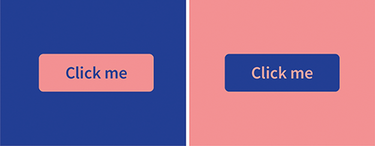
Compare the red and blue buttons to see how color temperature changes perceived visual depth. section 9.1.2
