Cool colors are typically greens, blues, and purples. They tend to suggest calm, relaxation, trust, or healing, while appearing quieter and more recessed than warm colors. section 9.1.2 section 9.3
Use cool color deliberately when shaping an interface:
- Choose green for themes involving nature, safety, growth, health, or relaxation. section 9.3
- Choose blue when the interface should feel tranquil, trustworthy, authoritative, loyal, or neutral. section 9.3
- Treat purple as flexible: it can feel cooler or warmer and may suggest luxury, mystery, spirituality, or power. section 9.3
- Expect cool colors to draw less attention and appear farther back than warm colors. section 9.1.2
Red and blue buttons
A red button on a blue background appears to sit forward. Swapping the colors makes the blue button feel more recessed, as though it sits inside a hole. This subtle depth effect can influence digital UI hierarchy. section 9.1.2
Figure 9.4 The red button on the left visually appears more forward than the blue button on the right.
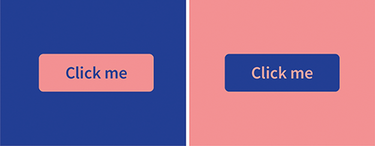
Compare the forward appearance of the red button with the recessed appearance of the blue button. section 9.1.2
