A Wasm container packages and distributes a WebAssembly binary using familiar container infrastructure, while executing the application as a Wasm module rather than initializing a traditional container userspace. It retains the portability and isolation associated with containers but avoids a guest OS, which can produce smaller artifacts and faster startup. section 7.7 section 1.1
The image can follow OCI image and runtime specifications, so existing registries and container tooling remain useful. Under a Docker-style stack, a Wasm-oriented shim and Wasm runtime replace the ordinary container process; containerd can manage the resulting workload directly. section 1.1 section 7.2
Figure 7.4 A closer look inside the Docker engine when executing a Wasm module, showing the key components, including containerd-shim-wasm and the Wasm runtime
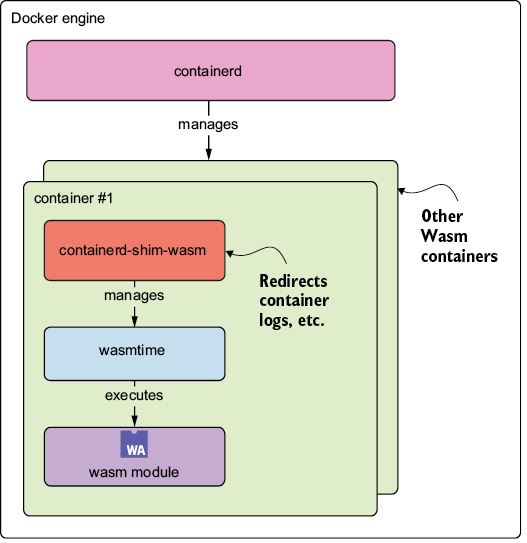
Compare the conventional engine path with the Wasm path: the key change is execution through containerd-shim-wasm and a Wasm runtime instead of a native container process. section 7.2
Build and run a wasi/wasm32 image
Create a Buildx builder, build the project for wasi/wasm32, and export an OCI archive. Import that archive into containerd, then run it with the io.containerd.wasmtime.v1 runtime. The platform flag identifies the image binary as Wasm, while the OCI archive preserves a standard distribution artifact. section 7.3.2
Choose a Wasm container with its trade-offs in mind:
- It can improve cold starts because only the application is loaded instead of a full userspace environment. section 7.3.2
- It can fit cloud-native distribution flows through OCI images and registries while preserving a lightweight Wasm deployment model. section 7.7
- It may struggle under highly concurrent workloads when single-threaded Wasm execution cannot use multiple CPU cores; runtime-per-request approaches can help. section 1.2.2
- Tool support remains uneven: Docker+Wasm is described as experimental and potentially unstable across Docker versions and environments. section 7.2
