A single-letter keyboard shortcut can save time for one person and create a barrier for another. Saying a word might trigger an unintended keypress for a speech-control user; a screen reader’s heading command might conflict with the shortcut. A WCAG success criterion turns a concern like this into a testable accessibility requirement. section 6.1.5
WCAG groups guidelines under four principles: perceivable, operable, understandable, and robust. Each guideline has testable success criteria—the requirements used to determine conformance. Criteria have levels A, AA, or AAA. The levels are cumulative: AA includes A, and AAA includes both A and AA. section 1.5 section 1.5.1
Make a character shortcut controllable
Level A Success Criterion 2.1.4 addresses shortcuts activated by a single character without a modifier key. If an interface uses one, let people turn it off, remap it to include a modifier, or limit its activation to when a specific element has focus. Do not make the shortcut the only way to use the function. section 6.1.5
TIP: Use the WCAG Quick Reference to filter guidelines, criteria, techniques, and failures for the technology you use. The success criterion states what conformance requires; supporting explanations and techniques help you interpret and implement it but are not themselves conformance requirements. section 1.5.1
Figure 1.2 This image illustrates the various components in WCAG 2.2. Guidelines are organized under four principles. Each of the 13 guidelines includes normative success criteria: the requirements used to determine conformance at levels A, AA, or AAA. WCAG also provides informative supporting material, including techniques, understanding documents, testing rules, and additional guidance to help explain and apply those requirements.
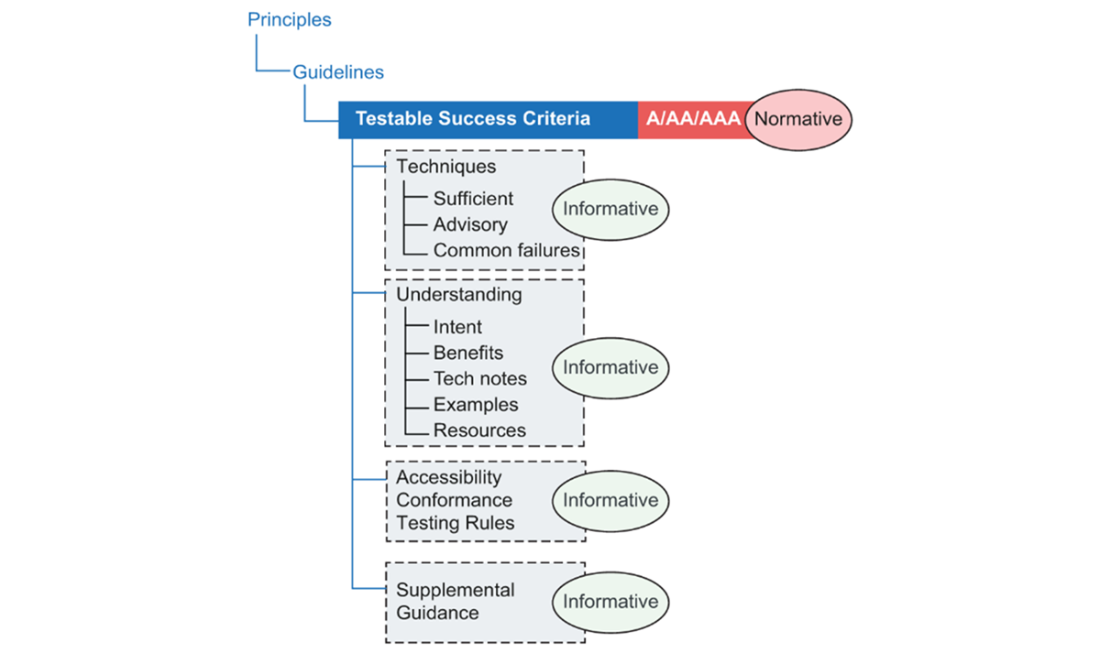
Use this hierarchy to locate a criterion beneath its principle and guideline, then distinguish the conformance requirement from supporting guidance. section 1.5.1