A Django form widget turns a form field into an HTML control. Each field has a default widget: a CharField normally renders a text input, while an EmailField renders an email input. Django supplies widgets for text inputs, textareas, selects, multiple-selection boxes, radio buttons, dates, times, and files. section 7.1 section 7.6
Choose a different widget when the field’s data type and its desired HTML control differ. For example, a CharField can use Textarea, producing a <textarea> instead of an <input>. Pass attrs to the widget to add HTML attributes such as rows, cols, or a CSS class. section 7.1 section 7.1.3 section 7.6
Configure a comment textarea
A comment field can remain a CharField while selecting forms.Textarea for its rendered control. Its attrs dictionary sets rows to 6 and cols to 50, so Django renders a textarea with those attributes while retaining the field’s normal form behavior. section 7.1
Widgets help with individual controls, not every layout requirement. CSS classes can style the generated tag, but widgets cannot use template conditionals or add the surrounding wrapper elements required by some frameworks. When custom markup is needed, render fields individually and preserve Django’s expected name and id attributes. section 7.1 section 7.1.3
Figure 7.1 The relationship between a Form object and the HTML
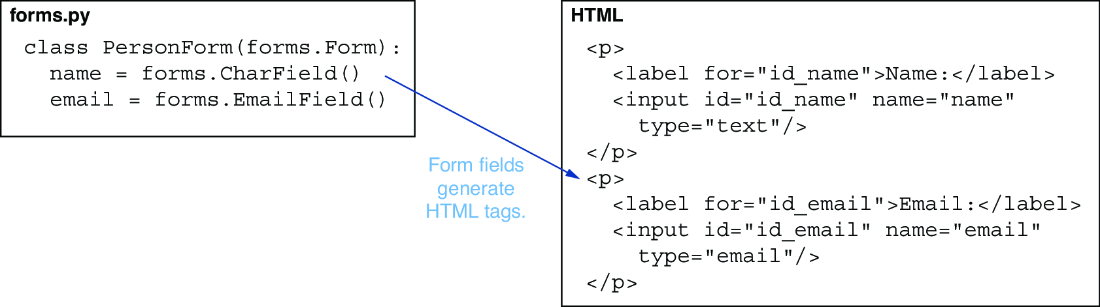
View the link between a Form, its fields, and the HTML controls rendered through their widgets. section 7.1
