WordPress is a visual, code-free platform for building and managing websites. It handles programming behind the scenes, so you can create pages, adjust layouts, choose options, and change content with graphical controls rather than HTML, PHP, JavaScript, or CSS. That makes it practical for professional, commercial, educational, personal, and business sites. section 1.1
A site can be built and refined as a sequence of connected decisions: choose hosting and a WordPress version, plan the site, select a theme and plugins, create content, manage media, improve appearance, grow an audience, and use analytics to improve visitors’ experience. AI can assist across many of these tasks, but your goals and judgment still shape the finished site. section 1.7 section 1.6
Start a new WordPress site with these practical priorities:
- Choose a hosting service before designing pages. Hosting stores and secures the site in the cloud, and responsive technical support matters when problems arise. section 1.6.1
- Choose between WordPress.com and WordPress.org. WordPress.com can suit a small personal blog, while independently hosted WordPress.org is presented as the more flexible option for sites needing plugins. section 2.1
- Use the host’s one-click installation tool to create an empty site, then work through the interface by clicking, dragging, dropping, and selecting options. section 1.1
- Plan early for security, backups, access management, and keeping the site hidden until it is ready to debut. section 2.0
Example: saving a revised page
After changing a page, actively save the work. The saving control may be labeled Publish when the page is first created and Update later; elsewhere it can be Save Menu, Save Changes, or Save. Publishing does not always mean visitors immediately see a changed page, especially when caching or draft and privacy settings are involved. section 2.5
Figure 1.4 An overview of the process of creating a new WordPress website (Diagram courtesy of Custom GPT “Diagrams: Show me”)
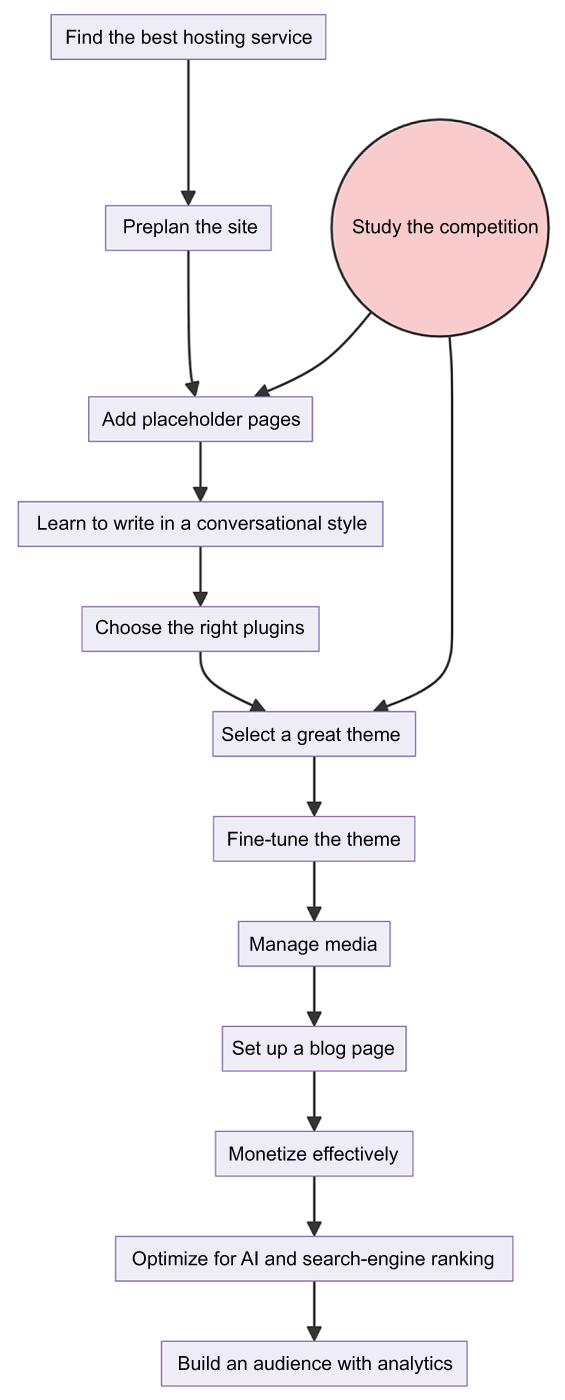
Use the process diagram to see the major website-building tasks in the order they are commonly encountered, from initial setup through refinement. section 1.6
WordPress is open source and free to use, although hosting services charge fees. Themes and plugins can extend a site, and both are rapidly adopting AI features. Continue developing practical skills while checking current resources as tools and AI capabilities change quickly. section 2.1 section 13.0

