A WordPress widget is a small, limited-function component placed in a sidebar or other widget-ready area. Use it for information that should stay visible across much of a site, such as store hours, contact details, a map, an events calendar, testimonials, or featured menu items. A theme determines which sidebar locations are available. section 5.9 section 6.0
Widgets resemble plugins, but usually do less and occupy a narrow area beside, below, or around the main content. A sidebar can appear on every page, although it can be hidden where it would be redundant. Widget Visibility in Jetpack can select which pages show particular widgets. section 5.9 section 5.11
To add an existing widget to a sidebar:
- Open Plugins > Add New, install and activate Classic Widgets if the site needs that sidebar-management interface rather than Gutenberg. section 5.9
- Open Appearance > Widgets to see the widgets supplied by the theme and installed tools such as Jetpack. section 5.9
- Open the desired widget, add it to an available sidebar area, and check the frontend to confirm its placement. section 5.10.1 section 5.9
A restaurant sidebar
A restaurant can use a right-side sidebar for currently featured menu items. Other compact choices include a clickable store map, an events calendar, sample blog posts, or testimonials. These supporting items remain separate from the page’s primary content while staying easy to find. section 5.9
Figure 5.13 A sidebar can contain specialized content, such as this restaurant’s currently featured menu items.
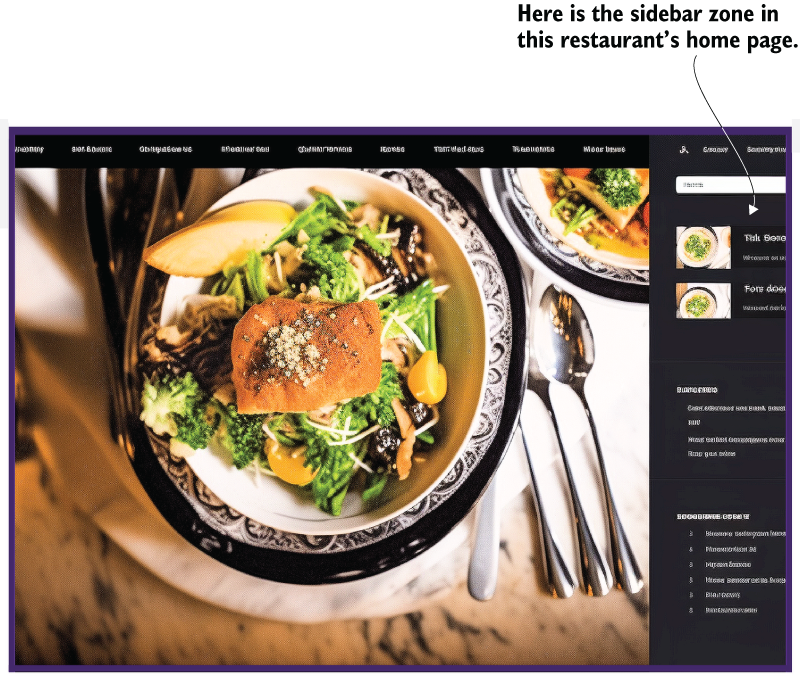
The restaurant layout makes the widget role visible: specialized, frequently useful content sits in a narrow sidebar beside the main page. section 5.9
A custom widget can also arrive as a plugin. For example, an AI prompt can request a light-blue sidebar widget that displays the current Greenwich Mean Time and date. Back up the site before testing generated code; copy the PHP into a file, rename it with a .php extension, compress it as a ZIP, upload and activate it through Plugins > Add New, then add the new widget from Appearance > Widgets. Refresh the page to see the time update. section 5.10 section 5.10.1
Treat AI-generated widgets as experiments rather than guaranteed solutions. Simple results may work, but more complex plugins can need intervention and debugging. Also evaluate installed plugins for popularity and current maintenance, since too many can create conflicts or slow page loading. section 5.10.1 section 5.11
