A write timestamp is attached to each ScyllaDB write and helps reconcile concurrent updates. When values conflict, the higher timestamp wins, so the newer value overwrites the older one. Inspect a column’s timestamp with WRITETIME or override it with a USING TIMESTAMP clause. section 6.6
Protecting data during migration
Suppose a migrator reads an article while an editor updates it through a dual-write workflow. If the migrator inserts its older copy with a higher timestamp, ScyllaDB can treat that copy as newer and overwrite the editor’s change. Use USING TIMESTAMP with a value no later than the start of the migrator’s read queries, preferably preserving the source database’s timestamp. section 12.2.4
Figure 12.7 If a dual-write updates a value that your migration has recently read but not updated, you can overwrite newer versions of data in your source application.
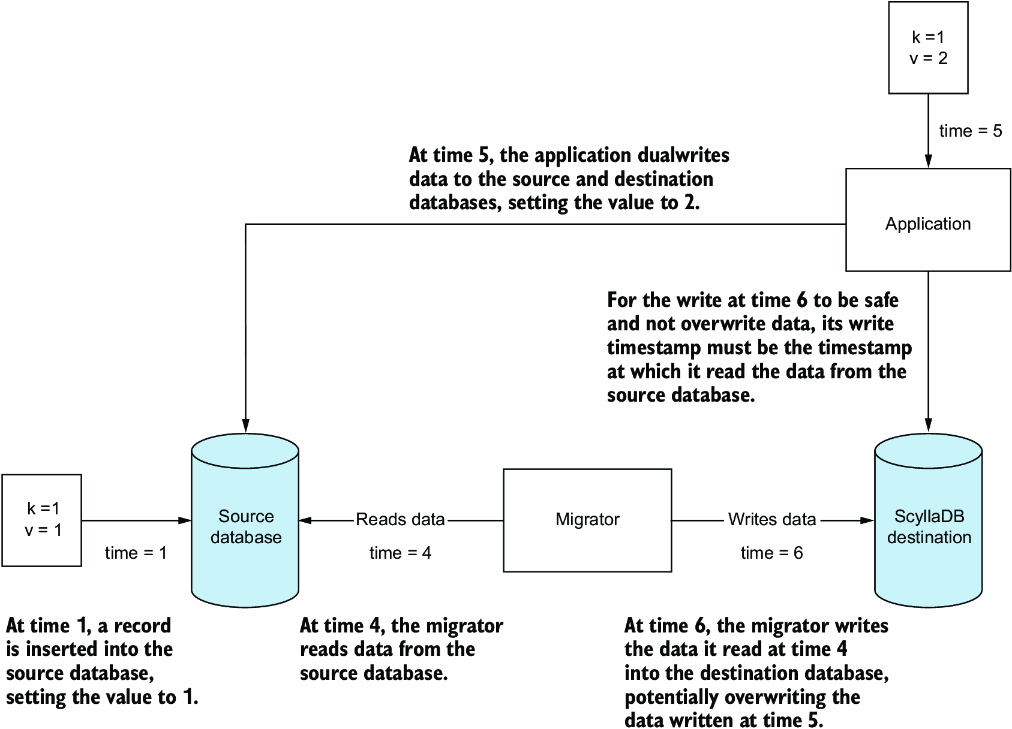
Trace how a dual-write update can race with a migrator and cause a higher-timestamp migration write to replace newer application data. section 12.2.4
